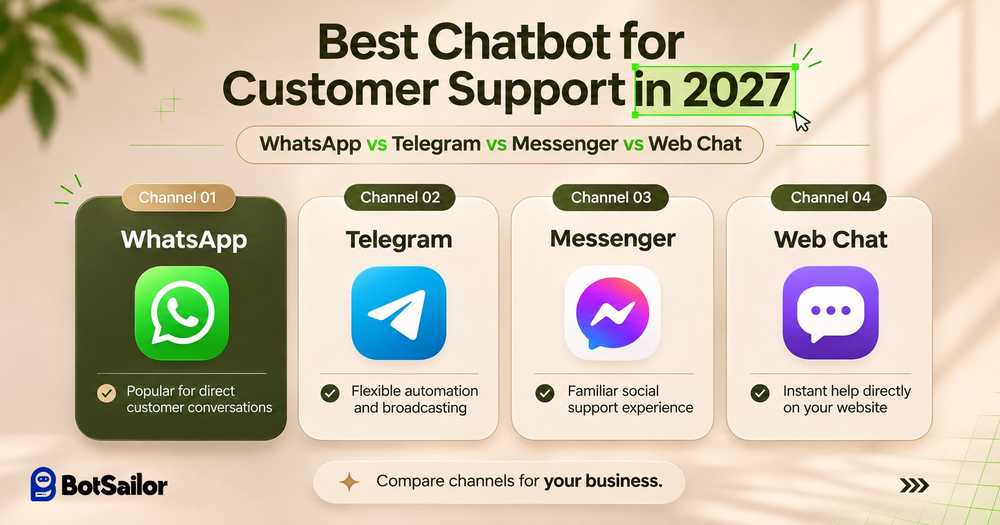
Which Customer Support Chatbot Is Best in 2027?
WhatsApp Best for customer communication, sales inquiries, order updates, and reaching customers who already use WhatsApp.
Telegram Best for affordable ongoing support, free standard broadcasting, subscriber engagement, and community management.
Facebook Messenger Best for Facebook-based businesses, advertising inquiries, automated lead qualification, and social customer support.
Website Live Chat Best for helping website visitors instantly, answering presales questions, and collecting leads before visitors leave.
BotSailor Best suited to businesses that want to connect all four channels, plus Instagram, with AI Agents, workflow automation, a Shared Inbox, and centralized customer management.
The key takeaway: There is no single messaging channel that wins in every situation. Businesses often benefit more from combining several channels with one customer support automation platform.
Customer support / 2027 field guide
Best Chatbot for Customer Support in 2027: WhatsApp vs Telegram vs Messenger vs Web Chat
FIG. 01 / Four channels, one support core.
Which chatbot is best for customer support in 2027? The answer depends on where your customers communicate, how much messaging costs, and whether your business needs AI automation, lead collection, or long-term customer engagement.
WhatsApp, Telegram, Facebook Messenger, and Website Live Chat offer different advantages.
WhatsApp helps businesses reach customers through a familiar messaging app. Telegram offers free standard bot messaging and broadcasting. Facebook Messenger connects businesses with their Facebook audience. Website Chat lets visitors get help without installing another app.
But choosing the right channel is only the beginning.
Businesses also need a customer support chatbot that can answer questions, collect leads, access customer information, perform actions, and hand conversations to human agents when necessary.
This guide compares all four channels, explains their pricing and messaging restrictions, and shows how businesses can manage them through BotSailor's omnichannel AI automation platform.
FIG. 02 / From a simple reply to a completed task.
What Makes a Good Customer Support Chatbot in 2027?
A basic chatbot answers predefined questions. A modern AI customer support chatbot can go further.
For example, imagine a customer asks:
Customer message“Can I get a refund for the order I placed yesterday?”
A simple chatbot might send a link to the refund policy.
A properly configured AI Agent can identify the request, ask for an order number, retrieve eligible order details through an integration, explain the applicable policy, and route the conversation to a human if approval is required.
That's the difference between simply replying and helping customers complete a task.
When comparing chatbot platforms, businesses should evaluate six things:
01Customer reach: Does the chatbot work on the channels customers already use?
02Messaging costs: Are there API fees, template charges, usage limits, or subscription costs?
03AI capabilities: Can the chatbot understand questions, use business knowledge, and perform approved actions?
04Customer retention: Can the business reconnect with customers after their first conversation?
05Human handoff: Can support agents take over complex or sensitive conversations?
06Integrations: Can the chatbot connect with order systems, websites, CRM tools, and other business applications?
These factors matter more than simply counting how many automated replies a chatbot can send.
FIG. 03 / Reach is huge, but the meter is running.
Section 01WhatsApp Chatbot: Massive Reach, but Increasing Messaging Costs
WhatsApp remains a practical customer support channel because businesses can communicate with customers through an app they already know.
Using the WhatsApp Business Platform, businesses can build automated customer journeys, collect leads, share product information, and provide AI-powered support.
■ Key Advantages of WhatsApp Chatbots
Familiar customer experience
Customers can ask questions through WhatsApp without visiting a separate support portal. Their conversations remain accessible in the app.
AI-powered customer support
A WhatsApp AI chatbot can answer product questions, collect details, guide customers through troubleshooting, and hand difficult inquiries to a support representative.
Sales and e-commerce automation
Businesses can connect WhatsApp with Shopify, WooCommerce, and other business systems to support order inquiries, sales conversations, and notifications.
Structured customer communication
WhatsApp supports interactive features such as buttons, approved templates, and WhatsApp Flows, depending on the integration.
■ WhatsApp API Pricing Changes for 2027
One important issue for businesses planning their 2027 customer support budget is the WhatsApp Business Platform pricing update introduced on October 1, 2026.
Under the updated pricing model:
Each business phone number receives 1,000 free service messages per month.
Service messages beyond the allowance are charged per delivered message.
Rates vary according to the recipient's country or market.
Marketing, utility, and authentication templates have their own applicable charges.
Utility templates sent during an open customer service window are also chargeable.
The standard 24-hour customer service window still applies to ordinary non-template replies.
Importantly, the 1,000-message allowance refers to eligible service messages, not 1,000 entire customer conversations.
Example:
Suppose your business sends 5,000 eligible WhatsApp service messages during a month from one business phone number.
The first 1,000 are covered by the free allowance. The remaining 4,000 are chargeable at the applicable rate, assuming no special pricing exception.
If the business also sends marketing or utility templates, those costs must be calculated separately.
For more information, read our WhatsApp API Pricing 2027 guide and why Telegram chatbots are becoming an alternative.
■ WhatsApp's 24-Hour Messaging Window
When a customer sends your business a message, a 24-hour customer service window opens.
During this period, your business can send standard replies, subject to the applicable service-message charges and allowances.
After the window closes, ordinary non-template replies are unavailable until the customer messages again. Businesses generally need an approved template to initiate further communication.
Best for: E-commerce businesses, retail brands, service providers, sales teams, and companies whose customers already prefer WhatsApp.
Main limitation: Messaging charges can increase as support volume grows, particularly when businesses send frequent replies and outbound templates.
FIG. 04 / Free broadcasting, at a controlled pace.
Section 02Telegram Chatbot: Free Customer Support, Broadcasting & Lead Retention
Telegram is a strong option for businesses that need ongoing customer engagement without standard per-message Bot API charges.
A Telegram chatbot can answer FAQs, guide customers through automated workflows, collect customer information, and share relevant announcements.
Businesses can also use Telegram bots for community management, product updates, and recurring subscriber communication.
■ Free Telegram Chatbot Messaging
Telegram's standard Bot API does not charge businesses per ordinary chatbot message within its usage limits.
This makes Telegram attractive for businesses handling repetitive support questions, onboarding requests, and frequent customer updates.
However, Telegram's free API messaging should not be confused with the total cost of running an automated customer support system.
A business may still pay for chatbot software, AI processing, hosting, or integrations.
■ Free Telegram Broadcasting
Telegram also supports broadcasting to users who have initiated contact with a bot and remain reachable.
Standard bots can send bulk notifications at approximately 30 messages per second without Telegram broadcasting fees.
Telegram also enforces additional limits, including restrictions on messages sent to individual chats and groups.
Businesses that need faster delivery can use Telegram's optional paid broadcasting capability, subject to eligibility and Telegram Stars charges.
This gives Telegram a useful advantage for businesses that want to distribute:
Product announcements and launch updates
Relevant promotional campaigns
Educational content and newsletters
Customer onboarding messages
Subscription reminders and service notifications
Businesses should still collect appropriate permission, avoid unsolicited promotions, and respect Telegram's anti-spam rules.
For a broader look at audience segmentation and campaigns, explore our guide to bulk messaging for large-scale audience outreach.
■ No WhatsApp-Style 24-Hour Messaging Window
Unlike WhatsApp, Telegram does not impose the same 24-hour customer service messaging window on bot conversations.
Once a user has started a Telegram bot, a business can continue appropriate communication while that user remains reachable.
This is particularly useful for onboarding sequences, support follow-ups, and ongoing subscriber engagement.
However, Telegram bots cannot initiate private conversations with arbitrary users. A person must first interact with the bot, and users can block it.
■ Better Opportunities for Subscriber Retention
When customers start a Telegram bot, the business can receive the Telegram user or chat identifier necessary to continue eligible conversations.
Through a chatbot automation platform, the business can organize those subscribers with labels, custom fields, and lists.
For example, a software company could collect a subscriber's product interest, send an onboarding sequence, and later share a relevant tutorial.
Telegram generally does not expose the customer's phone number to a bot by default. If a business needs an email address or telephone number, it must collect that information separately with appropriate consent.
■ AI Telegram Chatbot for Customer Support
With an AI-powered chatbot platform, businesses can use Telegram to answer common questions, explain pricing, qualify leads, and escalate requests.
BotSailor also supports Telegram chatbot automation, broadcasts, subscriber management, group management, and human support workflows.
Best for: SaaS platforms, online communities, educational services, digital products, recurring subscriber engagement, and cost-conscious support teams.
Main limitation: Customers must use Telegram and engage with the bot before the business can privately message them. Telegram is therefore not a direct replacement for WhatsApp in every market.
FIG. 05 / From public post to private conversation.
Section 03Facebook Messenger Chatbot: Strong Facebook Integration, With Messaging Restrictions
Facebook Messenger is particularly useful for businesses that generate customer inquiries through Facebook Pages, posts, and advertisements.
Customers can contact a business directly from its Facebook presence, reducing the steps between discovering a product and asking a question.
■ Key Advantages of Facebook Messenger Chatbots
Facebook Page integration
Businesses can automate responses to inquiries received through their Facebook Page.
Comment-to-conversation automation
Supported automation tools can help businesses respond to qualifying Facebook interactions and encourage users to begin private conversations.
AI-powered lead qualification
A Messenger AI chatbot can ask customers about their requirements, preferred products, budgets, and contact details.
Customer support automation
Businesses can automate FAQs, product questions, business hours, booking information, and support intake.
Human agent handoff
When a conversation needs personal attention, support representatives can take over through an integrated team inbox.
Learn more about choosing a suitable Facebook marketing automation platform.
■ Facebook Messenger's 24-Hour Messaging Rule
Messenger generally allows standard automated responses within a 24-hour messaging window opened by an eligible customer interaction.
After the window closes, businesses need an eligible messaging mechanism, such as a permitted message tag, approved utility message, or opted-in marketing messaging capability, where available.
A human support exception may allow eligible manual responses for longer, but it is not permission for unrestricted automated promotional messages.
■ Customer Privacy Considerations
Messenger conversations are linked to a customer's Facebook account.
Businesses may receive permitted profile information, such as a display name or profile picture.
This helps businesses recognize returning customers, but some people may prefer asking questions without using a personal social media identity.
Businesses should request only information necessary for support and follow applicable privacy requirements.
Best for: Facebook-based businesses, local retailers, social commerce brands, and businesses running Facebook advertising campaigns.
Main limitation: Messenger has messaging-window restrictions, and ongoing promotional communication requires appropriate permissions or supported messaging products.
FIG. 06 / Instant help, unless the visitor leaves.
Section 04Website Live Chat: Instant Support Without Requiring a Social Media Account
Website Live Chat allows visitors to contact a business directly from its website.
Unlike WhatsApp, Telegram, or Messenger, customers generally do not need to open another messaging app to ask a question.
This makes website chat useful for potential buyers who are still comparing products or services.
■ Key Advantages of Website Chatbots
Immediate assistance
A website chatbot can greet visitors, answer common questions, and help them find relevant information.
AI-powered product guidance
A trained AI chatbot can explain product differences, guide visitors toward suitable options, and answer questions using approved business knowledge.
Lead collection
Businesses can ask visitors for an email address, phone number, or other relevant contact details when appropriate.
Human handoff
A website visitor can move from automated assistance to a human representative without restarting the conversation.
No standard messaging-network fees
Website chat generally avoids WhatsApp-style per-message network charges, although chatbot software, hosting, and AI processing may still cost money.
■ The Biggest Limitation: Visitors Can Leave Without Being Identified
Suppose a customer visits an online store and asks about a product.
The chatbot answers several questions. The customer then closes the browser without providing any contact information.
Even if the business saves the conversation, it may not have a reliable way to reconnect with that customer.
Browser cookies may expire, visitors may clear their sessions, and customers may return from different devices.
■ How to Turn Website Conversations Into Leads
A business can reduce this problem by collecting customer information at the right moment.
For example:
01 The visitor asks about a product.
02 The chatbot answers the question.
03 The chatbot offers to send a quotation or product comparison.
04 The visitor voluntarily provides an email address or another preferred contact method.
05 The business saves the information and follows up through an appropriate, consented channel.
Website Chat can feel more private because it does not require a social media account. However, it is not automatically anonymous. A website may still process technical information, such as IP addresses and session identifiers.
For more practical applications, read Why Small Businesses Need Chatbots.
Best for: SaaS websites, online stores, service businesses, educational institutions, and businesses that generate leads through their websites.
Main limitation: Customers who leave without providing a contact method may be difficult to reach again.
FIG. 07 / The strongest setup is usually a combination.
Section 05WhatsApp vs Telegram vs Messenger vs Website Chat: Quick Comparison
These four options are customer communication channels. AI capabilities, automation depth, and integrations depend on the chatbot software connected to them.
Important: Messaging permissions and fees are established by each channel. A third-party chatbot platform cannot remove restrictions imposed by Meta or Telegram.
Section 06Which Customer Support Chatbot Should You Choose in 2027?
The best choice depends on how customers discover your business and what happens after they contact you.
■ Choose WhatsApp for Sales and Customer Communication
WhatsApp is a strong choice if customers already use it to ask about product availability, order status, delivery, or service appointments.
For many businesses, customer familiarity may justify the additional messaging costs.
■ Choose Telegram for Ongoing Support and Subscriber Engagement
Telegram is attractive when a business wants to maintain ongoing communication with subscribers, provide recurring support, or share announcements without standard per-message Bot API fees.
It can be particularly useful when customers already participate in Telegram communities.
■ Choose Messenger for Facebook-Generated Leads
Messenger makes sense when a large portion of inquiries originates from Facebook posts, advertising campaigns, and Page interactions.
A Messenger chatbot can guide interested customers toward the next step while reducing repetitive manual responses.
■ Choose Website Chat for Presales Questions
Website Chat is useful when visitors need answers before signing up, completing a purchase, or contacting a sales representative.
It can provide immediate assistance at the exact point where a customer is making a decision.
■ The Smarter Approach: Combine Multiple Channels
A business does not have to choose only one.
For example, an online store could:
Use Website Chat to answer product questions while visitors browse.
Offer WhatsApp for sales conversations and order updates.
Use Facebook Messenger for inquiries generated through social media.
Offer Telegram as an optional channel for ongoing support, announcements, and subscriber engagement.
This approach gives customers more choice.
It also helps businesses avoid relying entirely on a single messaging platform.
FIG. 08 / One platform behind every channel.
Section 07Automate All Four Channels with BotSailor
Managing separate chatbots, customer records, and support conversations across multiple platforms can become difficult as a business grows.
BotSailor brings customer communication and automation into one platform.
It supports WhatsApp, Telegram, Facebook Messenger, Instagram Direct, and Website Chat.
Businesses can create automated conversations, collect customer information, manage subscribers, deploy AI Agents, and organize human support without building separate systems for every channel.
■ 7.1. AI Agents That Do More Than Answer FAQs
BotSailor supports AI-powered customer service using business knowledge, configured instructions, and integrations.
Instead of relying only on predefined replies, businesses can create AI Agents for different responsibilities.
Examples include:
With the right configuration, these agents can work together in a structured customer journey.
For example, a lead qualification agent can gather customer requirements and transfer the conversation to a sales agent. A support agent can handle post-purchase questions and involve a human team member when approval or judgment is necessary.
BotSailor also supports agent routing instructions, separate knowledge sources, custom fields, labels, and integrations for performing approved actions.
For a detailed implementation example, see How to Build a WhatsApp AI Agent That Can Answer, Sell & Take Actions.
You can also explore how AI Agents support 24/7 customer service automation.
■ 7.2. Omnichannel Shared Inbox for Human Support
Automation cannot resolve every customer problem.
Some conversations require empathy, approval, negotiation, or access to information that an AI Agent should not handle independently.
BotSailor's Shared Inbox helps businesses manage automated and human conversations in one workspace.
Supported capabilities include:
Viewing conversations from connected messaging channels.
Assigning conversations to appropriate agents or teams.
Adding internal notes for team collaboration.
Organizing contacts with labels and lists.
Updating customer information through CRM fields.
Adding contacts to follow-up sequences.
Pausing bot or AI responses during human intervention.
Resuming automation when appropriate.
Viewing customer context and conversation history.
For example, when a customer requests an exception to a refund policy, an AI Agent can gather the order information and route the request to a support representative.
The employee can review the conversation, decide the next action, and respond without asking the customer to repeat everything.
■ 7.3. Visual Flow Builder for No-Code Automation
BotSailor's Visual Flow Builder lets businesses create automated customer journeys without writing code.
Users can connect conversation blocks, collect information, apply conditions, and trigger supported automation actions.
The upgraded builder includes features such as categorized blocks, faster configuration, custom field suggestions, and IF/ELSE logic.
A typical support flow might look like this:
Customer asks a question→Bot identifies the request→Collects necessary details→Checks a condition→Provides an answer or routes to an agent→Saves the information
Businesses can also combine visual chatbot flows with AI-powered responses.
Learn more in Explore the Upgraded No-Code Chatbot Builder.
■ 7.4. Collect Customer Information Across Five Channels
A customer support chatbot becomes more useful when it can save information in structured fields instead of leaving everything buried inside a conversation.
BotSailor's Input Flow feature allows businesses to ask customers questions one at a time and save answers into supported custom or system fields.
Input Flow is supported on WhatsApp, Telegram, Facebook Messenger, Instagram, and WebChat.
Businesses can collect information such as:
Customer name and contact details
Product or service requirements
Order references
Preferred appointment dates
Budget ranges and purchase timelines
Support issue categories
For example, a real estate company could ask visitors about their preferred property type, location, and budget.
The answers could be saved to fields used by the sales team.
BotSailor supports labels, sequences, webhooks, and Google Sheets integration in relevant workflow configurations. Specific Input Flow options vary by channel.
Read the detailed guide: One Form, Five Channels: Collect Customer Info on WhatsApp, Telegram, Facebook & Instagram.
■ 7.5. Broadcasting, Subscriber Segmentation, and Follow-Up Sequences
A chatbot should not only answer the first customer inquiry. It should also help businesses maintain relevant relationships over time.
BotSailor supports subscriber management, labels, sequences, and broadcasting capabilities on supported channels.
For example, a SaaS business might segment subscribers into:
New trial users
Customers requesting onboarding assistance
Existing paid customers
Users interested in particular product features
Each group can receive relevant communication through a channel where messaging is permitted.
Telegram is useful here because standard bot broadcasting does not have the same per-message charges as WhatsApp.
However, BotSailor sequences and broadcasts must still follow the rules of the underlying messaging platform. Having an automation feature does not authorize unrestricted outreach.
■ 7.6. Shopify, WooCommerce, and Business System Integrations
Customer support becomes more effective when a chatbot can access relevant business information.
BotSailor supports Shopify and WooCommerce integrations, HTTP APIs, webhooks, and Google Sheets workflows.
Depending on the connected systems and configuration, businesses can automate tasks such as:
Answering product questions
Collecting order details
Retrieving available order information
Sending relevant order notifications
Supporting cart recovery workflows
Saving new leads to business systems
Triggering automation based on external events
For example, instead of asking a support employee to search an order manually, a properly configured AI Agent can use an authorized API to retrieve its status.
Businesses should limit what customer information the AI can access and require human approval for sensitive actions when appropriate.
■ 7.7. Infrastructure Designed for High-Volume Automation
Reliability matters when businesses depend on chatbots for customer service.
BotSailor reports that it has rebuilt important parts of its infrastructure using optimized application logic, improved database processes, distributed servers, load balancing, and dedicated webhook handling.
Its architecture is designed to handle substantial automation traffic while reducing the risk of webhook retries and processing bottlenecks.
These improvements matter for businesses handling high conversation volumes, campaigns, or multiple connected channels.
For more technical information, read How We Rebuilt BotSailor for Stability, Speed, and Scale.
How Much Does BotSailor Customer Support Automation Cost?
Businesses should consider three separate types of costs:
01Messaging platform fees: Charges imposed by WhatsApp or other messaging providers where applicable.
02Automation platform subscription: The cost of using BotSailor's chatbot software, AI features, integrations, and team tools.
03Additional usage costs: Any applicable AI consumption, add-ons, or external integration charges.
■ BotSailor Pricing Overview
The following examples reflect publicly displayed pricing checked in November 2026. They are not guarantees of 2027 pricing.
The standard undiscounted monthly Premium 1K price is listed at $14.99. Premium pricing varies with subscriber limits, billing periods, promotions, and eligibility.
Additional team capabilities, advanced integrations, and higher subscriber limits are available through eligible paid plans.
Important: BotSailor's subscription does not eliminate Meta's WhatsApp API fees. Businesses using WhatsApp should account for messaging costs separately.
For current offers and feature availability, visit BotSailor Pricing Plans.
Practical Customer Support Chatbot Use Cases by Industry
Different industries can use these channels in different ways.
For additional ideas, explore Chatbot Use Cases for Different Industries.
Example: A Customer Journey Across Multiple Channels
Imagine an online store receiving a customer inquiry through Website Chat.
The customer asks:
Customer message“Do you have this product in another size?”
A BotSailor chatbot checks available product information through its configured knowledge or integration.
The customer then requests a quotation.
An Input Flow collects the relevant details and saves them as custom fields.
If the customer needs further assistance, the conversation is assigned to a human sales representative through the Shared Inbox.
The customer may also choose to subscribe to the store's Telegram bot for future product announcements.
Once the customer starts that bot and provides suitable permission, the business can use Telegram for relevant follow-up communication.
The business should not assume that a Telegram account and a website or WhatsApp contact belong to the same person. Customer records should only be linked using appropriate identifiers and consent.
This is how different messaging channels can support one customer journey without forcing the customer to use the same channel for every interaction.
FIG. 09 / Climb one step at a time.
How to Build an Effective Multichannel Customer Support Strategy
Start with a focused process rather than automating every conversation immediately.
01Step 1: Identify your busiest support channel.
Review where customers currently contact your business. A popular channel is usually a stronger starting point than one your audience rarely uses.
02Step 2: Find the most repetitive customer questions.
Look for questions that have reliable answers, such as opening hours, product specifications, delivery policies, or account setup instructions.
03Step 3: Build a small automation flow.
Create a chatbot that handles a limited number of well-defined support requests accurately.
04Step 4: Add structured information collection.
Collect only the customer details needed to complete the requested task.
05Step 5: Connect an AI Agent to verified business knowledge.
Make sure the AI has accurate information and clear instructions for when it should escalate a request rather than guess.
06Step 6: Establish human handoff rules.
Decide which conversations require staff involvement, such as complaints, disputed payments, account security questions, or unusual refund requests.
07Step 7: Add more channels based on customer demand.
After the first channel works reliably, expand to other supported platforms.
How to Measure Chatbot Performance
Don't judge a chatbot only by how many messages it sends.
Track these practical metrics:
A chatbot that sends fewer messages but resolves more problems may be more valuable than one that produces long automated conversations.
Final Thoughts: The Best Customer Support Strategy for 2027
The best customer support chatbot is not simply the one that sends the most automated replies.
It is the one that helps customers get accurate answers, complete tasks, and reach a human when necessary.
WhatsApp offers familiar customer communication, but messaging costs require attention.
Telegram offers free standard chatbot messaging and broadcasting within API limits, making it useful for ongoing customer relationships.
Facebook Messenger connects businesses with their Facebook audiences while operating under Meta's messaging rules.
Website Chat helps visitors get answers immediately, but businesses need a reliable way to retain leads when visitors leave.
For many growing businesses, the most practical approach is to combine these channels rather than depend on just one.
Next stepOne Platform. Five Channels. Smarter Customer Support.
With BotSailor, businesses can combine WhatsApp, Telegram, Messenger, Instagram, and Website Chat with AI-powered support, no-code chatbot automation, subscriber management, and a shared team inbox.
Start with your customers’ preferred channel, automate the tasks that matter, and expand as your support needs grow.
Start Building Your Customer Support Chatbot with BotSailor
Editorial note: Platform messaging rules and prices were researched in November 2026 for businesses planning 2027 operations. Future rates, allowances, eligibility requirements, and product features may change. Check each provider's current documentation before implementation.