
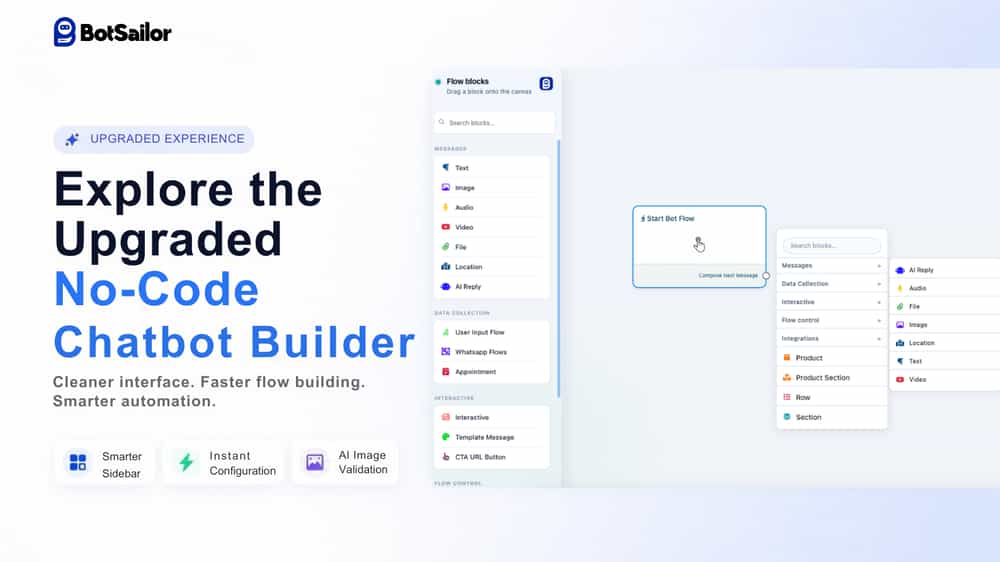
The rebuild of BotSailor no code chatbot builder introduces a much cleaner interface, a smarter sidebar with categorized blocks, instant modal configuration which is the settings popup now opens automatically when you connect a node, making the ai chatbot building faster and easier, smart custom field suggestions, advanced IF/ELSE logic which lets you create smart conditions to decide what happens next in the chatbot flow, and AI-powered image validation. These updates make building chatbot automations faster, more scalable, and little to no complication for businesses.
The BotSailor AI chatbot builder simplifies your business operations to maximum points. However, creating scalable workflows often involves clicking through endless menus and navigating cluttered screens. It can be tough for non technical personas. The development team at BotSailor recognized this friction and completely rebuilt the BotSailor Flow Builder experience.
This major upgrade focuses entirely on speed, simplicity, and scalability. By redesigning the core workflow experience, BotSailor helps users build complex AI agents, lead generation funnels, and customer support workflows with significantly fewer clicks.
This post covers exactly what changed in the latest BotSailor update, how the new tools operate, and why these features matter for your automation strategy.
What are the new features in the BotSailor no code chatobot builder?
The upgraded BotSailor ai chatbot builder includes several structural and functional improvements. Every change targets a specific obstacle or trouble in the traditional chatbot building process.
How does the redesigned sidebar improve workflow organization?
Finding the right block during an extensive build can break your concentration. The new BotSailor no code chatbot builder introduces a smarter sidebar with better grouping. Flow blocks are now organized into distinct, clean categories. These include:

Messages
Data Collection
Interactive Messages
Flow Control
Integrations
Now you know where you will find message options, where to find blocks for data control , integrations and so on. Additionally, a built-in search function allows you to find specific blocks instantly. This eliminates the need to scroll through long lists of icons when you need to quickly add a new element to your sequence.
How does instant configuration make flow building faster?
Speed is critical when mapping out complex chatbot conversations, right?. Previously, users had to connect a node and then manually open the settings, look for the specific settings and then configure it. Now, when you connect a new node in the BotSailor Flow Builder, the configuration modal opens instantly.
This simple change drastically reduces the number of clicks required to build a chatbot sequence. Workflow creation becomes much faster, allowing developers and marketers to maintain their momentum while mapping out customer journeys.
What makes the new node actions cleaner and easier to manage?
Large automation flows frequently become visually overwhelming & this can be intriguing. To combat workspace clutter, the new no code chatbot builder hides clone and delete actions until you interact with a node. These actions now appear exclusively on hover.

Connection delete icons also follow this hover-only rule. This delivers a cleaner, more modern builder experience and makes massive, multi-branch flows much easier to read and manage.
How do smart custom field suggestions work in BotSailor?
Personalization drives high-converting chatbot interactions. BotSailor makes adding personalized data into your messages seamless. By simply typing the "#" symbol inside a message block, the platform automatically suggests available custom fields.

You will immediately see options like #name#, #email#, or #anyCustomField#. You no longer need to memorize exact variable names or copy-paste them from a separate menu.
What are the capabilities of the AI-powered image validation tool?
One of the most powerful additions to the BotSailor platform is AI-powered image validation. User Input Flows can now automatically validate uploaded images using artificial intelligence.
Choose this feature if your business relies heavily on user-submitted visual data. It is perfect for automating tasks such as:
Receipt verification for loyalty programs
Payment proof checking for manual bank transfers
Document validation for onboarding processes
General image-based workflows
Instead of requiring a human agent to manually review every uploaded picture, the AI handles the first line of verification, saving countless hours of administrative work.
How does advanced IF/ELSEIF/ELSE logic handle complex flows?
Basic chatbots follow straight or one dimensional paths. Advanced AI agents require dynamic decision-making capabilities. BotSailor now supports multiple concurrent IF/ELSEIF/ELSE conditions within a single node.
This allows you to build highly advanced, personalized automation flows based on complex criteria. You can route users down highly specific paths based on their past interactions, custom field data, or tagged interests without creating tangled, messy flowcharts.
Who should use the upgraded no code chatbot builder?
The new BotSailor AI Chatbot builder is designed for better workflow experiences across the board. It is cleaner, faster, easier to navigate, and much more scalable for large automation flows.
Choose BotSailor if your team frequently builds complex ecommerce automations, customer support bots, or specialized AI agents. The reduction in necessary clicks and the addition of AI validation tools make it an ideal platform for businesses looking to scale their automated customer interactions without increasing their technical overhead.
What future improvements are coming to BotSailor?
The platform rebuild is just the beginning. The BotSailor development team is already working on the next phase of updates. Users can expect continued improvements in several key areas, including:
More robust AI-assisted automation features
Even easier configuration systems
Smarter workflow generation tools
Better visualization options for highly complex flows
The overarching goal remains simple: make powerful automation easier for everyone.
Take the next step with your chatbot automations
The rebuilt BotSailor no code chatbot builder proves that powerful chatbot software does not need to be difficult to use. By combining a clean interface with advanced AI validation and conditional logic, the platform empowers businesses to build smarter workflows. Log into your BotSailor account today to experience the upgraded builder firsthand and start optimizing your customer engagement strategies.
Read More BlogsHow We Rebuilt BotSailor for Stability, Speed, and Scale
Top Bulk Messaging Solution for Large-Scale Audience Outreach
What’s the Best Facebook Marketing Platform for Marketing Automation?