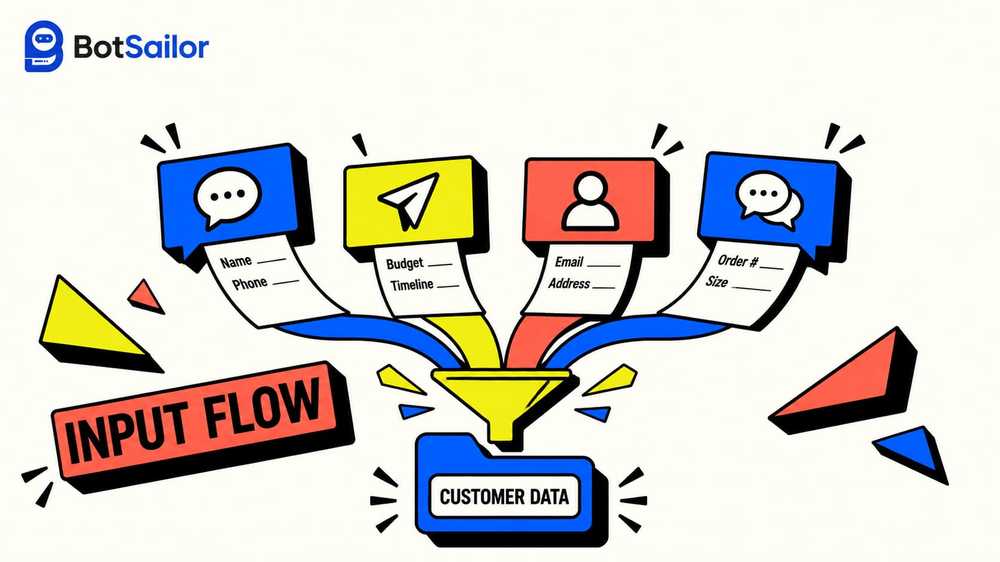
WhatsApp, Telegram, Facebook & Instagram Input Flow: Collect Customer Info, Automatically
One drag-and-drop node, five channels, and every answer saved exactly where your team needs it.
Key takeaways
- Input Flow is a drag-and-drop node that asks a series of questions and saves each answer to a custom or system field, on WhatsApp, Telegram, Facebook, Instagram, and WebChat.
- Every channel shares the same starting trigger: keywords, labels, lists, sequences, team assignment, webhook, and Google Sheets.
- WhatsApp has the richest flow-level setup, with Labels built into the Input Flow node itself.
- Facebook and Instagram add more at the question level: labels and sequences straight from an answer. Telegram trims it down and adds internal Notes instead.
Every Business Needs Customer Information. Most Are Still Collecting It the Hard Way.
A customer messages your WhatsApp number asking about a service. Someone else DMs your Instagram wanting a quote. A third person starts a chat on Telegram to book a table. Three channels, three conversations, and three separate places where customer information gets typed, half-answered, or lost the moment the tab closes.
Input Flow fixes that. It is a drag-and-drop node inside the Visual Flow Builder that lets you build a series of questions, one at a time, and choose exactly where each answer is stored, in a custom field, a system field, or both. No developer, no spreadsheet copy-paste, no customer info sitting in a chat thread nobody re-reads. Input Flow is live on all five BotSailor channels: WhatsApp, Telegram, Facebook Messenger, Instagram, and WebChat, so the same structured customer information you capture on one channel can be captured the same way everywhere else, turning scattered chat replies into real client data instead of screenshots and half-remembered notes.
Whether your team calls it customer info, customer information, or client data, the underlying problem is the same: without a system behind it, it lives in someone's memory or a chat scrollback nobody re-reads. Input Flow turns that into real customer data management, one saved answer at a time.
This is the guide to how it actually works, channel by channel, including exactly where the options differ, so you can build the right form for the right conversation.
Before the Questions: What Every Bot Flow Can Already Do
Before a customer ever reaches an Input Flow, they usually land on a trigger, a Configure Reference step that fires when a message matches trigger keywords like "Hello," "Hi," or "Start." Here you choose exact keyword matching or loose string matching, give the trigger a title, and then, this is the part worth knowing, you get a full set of Automation Actions before a single question is asked:
- Add or remove a label
- Add to or remove from a list
- Subscribe to or unsubscribe from a sequence
- Assign the conversation to a team or a specific team member
Scroll down and there is a Data & Integrations panel too: save a value straight to a custom field, forward the data to a webhook URL, or sync it live to a Google Sheet. All of this sits at the very start of the bot flow, before Input Flow even begins, and it is identical across every channel. That consistency matters for customer data management, because it means your labels, your sequences, and your webhook are set up the same way whether the conversation started on WhatsApp or Instagram, and the client data they produce lands in the same custom fields either way.
WhatsApp: The Deepest Input Flow
WhatsApp carries the richest version of Input Flow, and it starts with a plain description worth taking seriously: name the campaign for what it actually is, a survey, an order collection form, a reservation, an appointment, or any other multi-question process, because every answer is saved as one consolidated record you can export straight to CSV. That single line is the difference between customer info scattered across chat logs and client data you can actually run a report on, real customer information your sales team can search, filter, and trust.

Setting up the flow itself, the Configure User-Input-Flow node, gives you:
- User Input Flow: select an existing flow or create a new campaign from scratch
- Labels: add or remove subscriber labels the moment this flow runs, plus add to or remove from a list
- Integrations: forward the collected data to a webhook, or sync it to Google Sheets
Then comes each individual question, configured on its own node:
- Question Type: Free keyboard input for an open answer, or Multiple choice, where you write the option button label and add as many answer options as you need
- The question text itself, with a shortcut to insert a custom field or the subscriber's name directly into the message using #
- Reply Validation, where you set the expected reply type: Text, Email, Phone, Number, URL, File, Image, Video, Date, Time, or Datetime, so a phone number question actually rejects a random sentence
- Save Response: send the answer to a custom field (BotSailor shows your full existing field list here, from Address to Package ID to Shipping Status) or to a system field like Email, Phone, Birthday, or Location
- Additional Options: a skip button for optional questions, plus calendar integration for appointment-style flows

On the canvas, this reads as a simple chain: Start leads into User Input Flow, which replies and opens the First Question, and each question then branches to the Next Question or to a Thank-you Message once the sequence ends. That branching is what makes a WhatsApp Input Flow feel like a real conversation instead of a form, while still saving every answer as structured customer information behind the scenes, the kind of client data a spreadsheet import could never guarantee.
Telegram, Facebook & Instagram: Same Start, Different Depth
Here is the part worth knowing before you build, and it matters for anyone doing customer data management across more than one channel: Telegram, Facebook, and Instagram all begin with that exact same start described above. The trigger keywords, the labels, the sequences, the webhook and Google Sheets integration, none of that changes by channel.
Where it changes is inside the Input Flow itself.
Configure User-Input-Flow on Telegram, Facebook, and Instagram is simpler than on WhatsApp. You get the same description box and the same flow selector, but the Labels section is gone. What is left is just the flow selector plus Integrations: forward data to a webhook, or sync data to Google Sheets. If you need to add labels or lists for this campaign specifically, do it at the trigger step above, since the node itself will not offer it here.
Configure New Question on Telegram trims it further, and adds something the others do not have: a Notes field. Alongside Reply Validation and Save Response, you get an Additional Options section for internal Notes, plain text your team can read later, with no label or sequence assignment at the question level. It is a leaner build, which fits how most people actually use a Telegram bot, quick structured intake without a full marketing sequence attached to every question.
| Telegram | Facebook / Instagram | ||
|---|---|---|---|
| Start (trigger + actions) | Full set | Full set | Full set |
| Flow-level Labels | Yes | No | No |
| Question-level labels & sequences | No | No | Yes |
| Question-level Notes | No | Yes | No |
| Reply Validation types | Text, Email, Phone, Number, URL, File, Image, Video, Date, Time, Datetime | Yes | Yes |
| Calendar integration | Yes | Question-level Notes instead | At flow trigger level |
Where Input Flow Actually Gets Used
The same node works for very different kinds of customer info, depending on what you name the campaign:
- Lead qualification: name, need, budget, timeline, saved straight into custom fields your sales team already uses
- Order collection: item, quantity, size, delivery address, validated as Text, Number, or Address fields so nothing arrives malformed
- Reservations and appointments: date and time questions paired with the calendar integration, so a WhatsApp or website chat can book a real slot without a phone call
- Surveys and feedback: multiple-choice questions that export cleanly to CSV for reporting
- Support intake: a short set of questions before handoff, so a human teammate opens the ticket already knowing the details instead of asking again, working from client data instead of a half-read transcript
Every one of these is really the same operation: a series of questions, an answer type, and a destination field. Once you have built one, the pattern is easy to reuse across a whole customer data management workflow, from first contact to the record your team actually works from, and every field stays consistent whether the customer info came in through WhatsApp or a website chat.
Why Structured Customer Info Beats a Chat Log
A chat thread is not client data, and a folder of screenshots is not customer information either. Both are a conversation someone has to re-read to extract a phone number or an address. That gap costs real money. Formstack's analysis of over 650,000 form submissions found multi-step forms complete 25.4% more often than single-page forms, and Baymard Institute's research on abandonment found 22% of people quit a form specifically because it felt too long or too complicated. Breaking a request into one question at a time, the way Input Flow does, is a direct answer to both problems.
Speed matters just as much as structure. Sprout Social's research on social customer care found a large share of consumers expect a reply within an hour of reaching out on a messaging channel, and channels like website chat and text message rank among the fastest-expected. A bot that asks the right question the moment someone messages, and saves the answer instantly, meets that expectation without anyone on your team lifting a finger at 11pm.
Get customer data management right at this stage and every later report, every filtered list, and every client data export downstream gets easier, not harder.
Bringing It Together: One System, Every Channel
Input Flow is one part of a bigger idea: social media automation should not mean five different tools for five different inboxes. The same Configure Reference start, the same custom fields, the same webhook and Google Sheets sync, work whether a customer reaches you through WhatsApp, Telegram, a Facebook comment, an Instagram DM, or a chatbot for website visitors on your homepage. That is what real social media automation tools should look like: one flow builder, one customer data management system, five channels feeding the same fields, so customer info gathered on Instagram is exactly as usable as customer information collected on WhatsApp.
If you already run text marketing or text message marketing sequences, this is where they start: a Reply Validation step confirms the phone number is real before a single message ever sends. If you are managing a Facebook Page and an Instagram account from the same small team, this is how you stop copying customer information between spreadsheets by hand, and start treating every reply as client data worth keeping.
Start with one flow, one channel, and one question. Add the next question once the first one is working. That is genuinely the whole build, and it is also the fastest way to get real customer data management running without hiring anyone new.
By the Numbers: Why Conversational Data Collection Wins
- Multi-step, conversation-style forms complete 25.4% more often than traditional single-page forms, based on Formstack's analysis of over 650,000 form submissions.
- 22% of people abandon a form specifically because it is too long or too complicated to finish, according to the Baymard Institute.
- Most consumers now expect a business to reply on a messaging channel within an hour, per Sprout Social's ongoing research into social and messaging customer care.
- WhatsApp alone reaches roughly 3 billion monthly active users, making it one of the largest single channels for collecting customer info in a conversational format, and a serious foundation for any customer data management strategy.