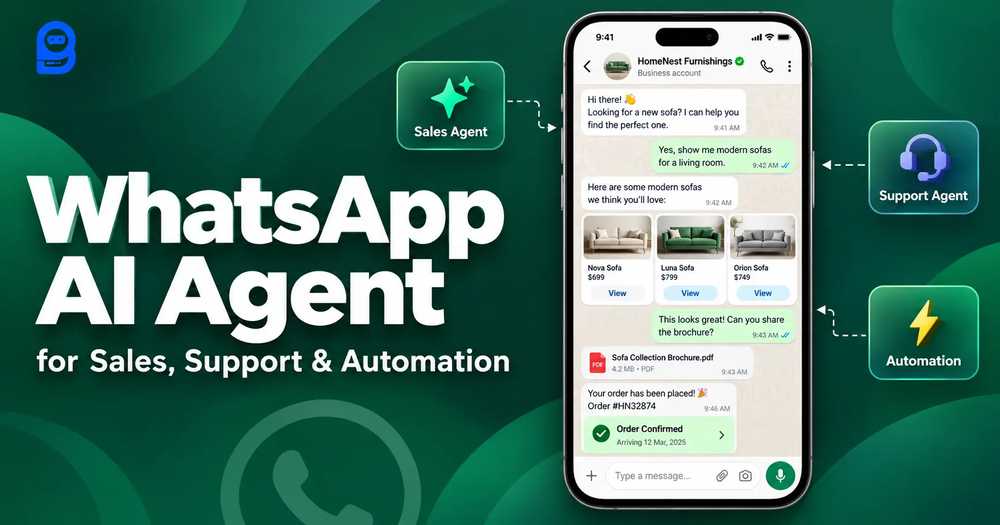
A basic WhatsApp chatbot only replies. A WhatsApp AI agent takes action: it tags the lead, saves data, sends photos and catalogs, checks an order, and hands off to a person.
- Use three agents: Frontline (qualifies), Sales (sells with proof), and Support (resolves), linked with ##transfer_agent##.
- Speed decides revenue: leads contacted within 5 minutes are 21x more likely to qualify than leads contacted at 30 minutes.
- Nothing runs until you switch on AI Configuration: select your Active Agents and write Agent Routing rules.
- Everything is set up in plain language, with no code.
Bottom line: start with one Frontline Agent, then add Sales and Support.
Key takeaways
- A basic whatsapp chatbot ai replies. An AI agent can take action: tag the lead, save data, send photos, check an order, and hand off to a person.
- The ideal setup uses three agents (Frontline, Sales, Support) routed with
##transfer_agent##. - Speed decides revenue. Contact within 5 minutes and qualification odds are 21x higher than at 30 minutes.
- You configure all of your WhatsApp automation in plain language, with no code.
WhatsApp now has three billion monthly active users, up from two billion in 2020. Your buyers are already there. The real question is what happens after they message you.

Not much, at most companies. A Harvard Business Review study of online leads found an average first response time of 42 hours , and 23% of companies never replied. Related MIT and InsideSales research, summarized by Fronetics , found leads contacted within five minutes were 21 times more likely to be qualified than those contacted after thirty.

That gap is why Whats App automation has become a revenue lever, not a nice-to-have. Gartner predicted in 2022 that conversational AI would cut contact center labor costs by $80 billion in 2026. Yet the same report cites Zendesk research showing 60% of customers are frequently disappointed by chatbots. The fix is not more scripts. It is an agent that understands, decides, and acts.
If you are searching for a WhatsApp chatbot AI, you probably want three things: instant answers, more qualified leads, and fewer repetitive tickets for your team. A well-built WhatsApp chatbot AI delivers all three, but only when it is wired into your catalog, your store, and your inbox. A standalone bot that cannot reach those systems is just a faster FAQ page. The rest of this guide shows how to connect them, so your WhatsApp chatbot AI does real work.
What Is a WhatsApp AI Agent, and Why Does a Basic Chatbot Fall Short?
A scripted bot runs on menus: press 1 for sales, press 2 for support. Those WhatsApp bot commands are brittle, because buyers type what they mean, not what the menu expects. An AI agent reads intent, remembers the conversation, and works with your data. Think of it as a WhatsApp AI assistant that never sleeps and knows when to call a human.
| Capability | Scripted WhatsApp chatbot | AI agent |
|---|---|---|
| Understands free text | Keywords and menus | Reads intent and context |
| Takes actions | Fixed replies | Tags, saves fields, calls APIs, transfers |
| Uses your data | Static text | Knowledgebase, media, live store data |
| Human handoff | Manual | Rule-based, with notes attached |
| Setup | Flow building only | Plain-language prompt plus action tags |
A whatsapp chatbot for business should do more than answer FAQs. If you are comparing any ai chatbot for whatsapp, ask one thing: can it take action inside your systems? BotSailor gives you both halves: a visual whatsapp chatbot builder for fixed steps, and AI agents for reasoning. Good bot integration with WhatsApp also means the same agents work on Instagram, Messenger, Telegram, and website chat.
The Blueprint: An Ideal WhatsApp Business Automation
We will build a store called Luma Home, in six layers: entry, qualification, sales, support, human handoff, and proactive follow-up. Actions are written inside the system prompt as ##action_name## : id. Type ## in the prompt box to autocomplete, and the UI shows names while the prompt stores numeric IDs. This is how you set up whatsapp business automation without code.
Step 1: Open the door with entry points
Run Click to WhatsApp Ads, a website chat widget, or a QR code. Each opens a chat instead of a form. That is a whatsapp lead generation chatbot in its simplest form: the lead is a conversation from the first tap.
Step 2: The Frontline Agent qualifies and routes
The first agent greets, asks one question at a time, records answers, and routes. It follows the lead qualification pattern: intent, budget, fit, urgency.
Go to Chatbot Manager---> AI ----> Agents ---> Create AI Agent
Add name, slug, description, and use this System Prompt
  # Role
  You are the Frontline Agent for Luma Home on WhatsApp.
  Greet warmly. Ask one question at a time: need, budget, timeline.# Save and tag
  When budget is confirmed: ##save_custom_field## : 42
  Ready within 30 days: ##add_label## : 12# Route
  Buying intent confirmed: ##transfer_agent## : 18
  Order or delivery question: ##transfer_agent## : 21# Keep it clean
  Spam: ##block_subscriber##
  Vague or off-topic: ##skip_reply##
Step 3: The Sales Agent sells with proof
Once intent is confirmed, the Sales Agent takes over. It recommends products from your store, sends real photos and PDF catalogs from the knowledgebase, and asks for the sale. Bind the store first: Shopify actions require ##shopify_store##, and WooCommerce actions require ##woocommerce_store##. See the Shopify and WooCommerce agents.
Here, create another agent & use this System Prompt
    # Role
  You are the Sales Agent. Recommend products, answer pricing,
  handle objections, and ask for the sale.# Store
  ##shopify_store## : 12
  For product questions: ##shopify_recommend_products### Proof
  When asked for photos, a demo, or the catalog, send them from
  Knowledge Sources (Media). Never paste image URLs.# Close and follow up
  Quote confirmed: ##call_http_api## : 5 | reply_with_static_reply | Thanks! Your quote request is with our team.
  Not ready yet: ##assign_sequence## : 8
  Bulk or custom order: ##add_note## : Bulk quote requested
  Then: ##assign_human_role## : 3
Ask what makes the best AI sales agent and the answer is not a smarter greeting. It is this block: proof, store data, a CRM push, and a clean human handoff.
Step 4: The Support Agent resolves
After the sale, a customer support agent AI answers only from your knowledgebase and closes finished chats. See the customer support agent with this system prompt.
      # Role
  You are the Support Agent. Answer only from the knowledgebase.# Orders
  ##shopify_store## : 12
  Ask for the order number, then: ##shopify_get_order_details##
  Tag handled orders: ##shopify_update_order_tag## : whatsapp-connected
  Cancel only when the customer clearly asks: ##shopify_cancel_order### Handoff and close
  Refund dispute: ##add_note## : Refund dispute
  Then: ##assign_human_member## : 335
  Resolved: ##mark_as_solved##
  Check back tomorrow: ##follow_up## : 24
Step 5: Feed the knowledgebase
The prompt controls behavior. The knowledgebase supplies facts: pasted content, URLs, files, media, a live Google Sheet, or an API feed. Build one Knowledge Set and reuse it across all three agents. Product photos and galleries go under Media, never as URLs in the prompt. If the two ever disagree, the system prompt wins. The complete setup guide walks through it.
Step 6: Wire in the built-in WhatsApp features
This is where Whats App automation becomes a workflow, not a chat. Keep the visual WhatsApp chatbot builder for fixed steps like forms and payments, and let the agents handle judgment:
- WhatsApp Flows: a native in-chat form for name and budget. See how it works.
- Catalog and checkout:sell from your Meta catalog, and add WhatsApp Pay where available.
- Appointment booking: offer real calendar slots for a showroom visit or demo.
- WhatsApp Calling: move high-ticket buyers from chat to a voice call.
- Broadcasting and sequences: with approved templates, broadcasts and follow-ups make your agent an outbound AI sales agent for opted-in contacts.
- Shared Inbox: Join Chat, then Pause AI so the buyer is not answered twice. Inbox IQ adds a lead score out of 100 and a next action, which is AI for agent teams: your human agents open every thread already briefed. Explore Shared Inbox.
Switch It On: AI Configuration and Agent Routing
Everything above lives in prompts and knowledge. One screen decides whether any of it actually runs: AI Configuration. Creating an agent is only half the job, because an agent does nothing until you enable it for a bot and tell the platform which messages belong to whom. Just switch to , AI Configuration beside the AI Agents tab. This is the step that turns three separate prompts into one WhatsApp business automation team.
Turn on AI and choose your Active Agents
Start with the top card. Flip the AI Agent switch on, then open Active Agents and select every agent this bot should use. You can pick several at once. For Luma Home that means Frontline, Sales, and Support. Just tap in the Active Agents box to add it.
Selected agents can switch among themselves, so a ##transfer_agent## line can only hand a chat to an agent that is active here.
Write Agent Routing rules: which message goes to which agent
Below the picker, Agent Routing answers one question: what kind of customer message should go to each agent? These rules decide who replies first and where chats can transfer. Select Add Rule and fill two fields:
- Message type / when to use this agent: the words and short phrases that signal the topic, separated by commas.
- Assign agent: the agent that should handle that topic.
The trash icon removes a rule. The screen's own hint shows the idea: "pricing / buy / product" goes to a Sales Agent, and "bug / account / help" goes to a Support Agent. Here is the same pattern for Luma Home, with one job per agent:
| Message type / when to use this agent | Assign agent | What that agent does |
|---|---|---|
| hello, hi, browsing, looking for, need help choosing, budget | Frontline Agent | Greets, asks need, budget, and timeline, then transfers |
| price, pricing, buy, quote, discount, catalog, photos, bulk | Sales Agent | Recommends products, sends proof, asks for the sale |
| order, delivery, track, status, package, refund, cancel | Support Agent | Checks the order and answers from the knowledgebase |
- One job per agent. Keep each rule's words distinct so two agents do not compete for the same message.
- Use your customers' real wording. Skim recent chats and copy the phrases people actually type.
- Rules pick who replies first. After that, agents pass the chat along themselves with
##transfer_agent##, exactly as written in the prompts from Steps 2 to 4.
Choose the AI Response Mode
AI Response Mode decides when the AI answers at all. There are two options:
| Mode | What happens | Best for |
|---|---|---|
| AI Agent for All Queries | The AI responds to every incoming query, even if a bot flow or keyword could match. | AI is your front door, such as ad traffic that should always meet the Frontline Agent |
| AI as a Fallback Only | Bot flows and keywords run first. The AI answers only when nothing matches. | Setups that already use visual flows for forms, payments, or menus |
Because this guide keeps the visual builder for fixed steps like forms and payments, Fallback Only is a safe starting point. Switch to All Queries when you want the agents to own every conversation.
Set memory, assignment, and business hours
- Context & Memory: turn on Enable Contextual Memory so agents remember earlier messages instead of asking again. Memory Window sets how much history they keep (the screen shows 4 Conversations). More memory means higher AI token consumption, so start small and raise it only if agents forget details.
- Assignment: the Assign to Team or Department switch is for chats that should land with a specific team. Use it together with the human handoff lines in your prompts, such as
##assign_human_role##. - Business Hours: select Edit to set your time zone, business hours, and off days. With Do Not Assign Agent in Business Off Hour switched on, chats are not assigned to your team when nobody is working, while your agents can keep replying.
- Typing indicator: in Misc. Settings, switch it on to show the customer that a reply is on its way.
Add restrictions and fine-tune replies
- Restricted Topics: type a topic and press Enter to add it. Use this for subjects your agents must not discuss, such as legal advice, medical claims, or competitor pricing.
- Response for Restricted Keywords: the message sent when a restricted topic comes up, up to 500 characters. The default is a plain refusal, so rewrite it to offer a next step.
- Delay for AI Reply (Seconds): 0 means no delay, and the maximum is 60 seconds. Since speed decides revenue, keep it at 0 or a couple of seconds.
- AI Reasoning Level for Responses: the screen shows Low. Start there, watch real chats, and raise it only if answers to complex questions come out shallow.
Thanks for asking. I can't help with that in chat, but our team can. Please message us at support@yourstore.com.
Save, then test every rule
Select Save Settings. (Reset to Default restores the original values.) Then read the AI Assistant Overview on the right: it summarizes Active Agents, Agent Routing, Response Mode, Contextual Memory, Restricted Topics, and Reasoning Level, so you can confirm everything at a glance. Finally, message your own number once per rule. "What does the bulk price look like?" should reach the Sales Agent, and "Where is my order?" should reach the Support Agent. Here is a sensible starting setup for Luma Home:
| Setting | Starting value |
|---|---|
| AI Agent | On |
| Active Agents | Frontline, Sales, Support |
| Agent Routing | Three rules, one per agent |
| Response Mode | Fallback Only, or All Queries if AI is your front door |
| Contextual Memory | On, with a small Memory Window |
| Restricted Topics | Legal, medical, and competitor questions, with a helpful reply |
| AI Reasoning Level | Low, raised only if needed |
Haven 3-Seater: $749
Here are the photos and catalog.
The Full Workflow, Start to Finish
| # | What happens | Feature or action |
|---|---|---|
| 1 | Shopper taps a Click to WhatsApp ad | Chat opens instantly |
| 2 | Frontline Agent asks need, budget, timeline | ##save_custom_field##, ##add_label## |
| 3 | Intent confirmed, chat moves on | ##transfer_agent## |
| 4 | Sales Agent sends real-room photos and catalog | Knowledge Sources (Media) |
| 5 | Buyer books a showroom slot | Appointment booking |
| 6 | Large order goes to a closer, by chat or call | ##assign_human_role##, Calling |
| 7 | After purchase, order status is checked | ##shopify_get_order_details## |
| 8 | Quiet leads are revived; offers go out | Sequences, broadcasts |
Every step is a decision the agent makes, then acts on. That is the difference between chatting and selling. It is also why a whatsapp chatbot ai built this way lifts speed without lifting headcount.
Notice what the human team never does: re-ask questions, copy data between tools, or guess how hot a lead is. The agents capture the fields, apply the labels, and leave notes, so closers spend their time on conversations, not admin. Multiply that across dozens of daily chats and the saved hours compound.
Where WhatsApp Automation Pays Off Fastest
Pick the use case where a WhatsApp chatbot for business earns back time first:
- Lead capture: a whatsapp lead generation chatbot turns every ad tap into a scored conversation, so sales only sees buyers who are ready. Budget for WhatsApp lead generation the way you budget for ads.
- Support deflection: a WhatsApp chatbot AI answers order-status and policy questions instantly, at any hour, and passes only the tricky ones to people.
- Re-engagement: sequences and approved templates revive quiet leads without anyone remembering to follow up.
- Team assist: treat the agent as a WhatsApp AI assistant for your whole team, summarizing threads and suggesting next steps.
Five Mistakes That Break WhatsApp Automation
- One agent for everything. Even the best WhatsApp chatbot AI loses focus when a single prompt does every job. Split Frontline, Sales, and Support.
- Image URLs in the prompt. Add photos under Knowledge Sources (Media) instead.
- Skipping the store binding. Store actions will not save until a connected store is picked first.
- No handoff rule. A WhatsApp chatbot AI that cannot take action or pass a hot lead to a person stalls deals. Always write an
##assign_human_role##line. - Ignoring opt-in. Message only people who agreed to hear from you, and use approved templates outside the 24-hour window.
Why This Wins, and How to Measure It
WhatsApp business automation is only as good as its metrics. Track four numbers: first-response time, qualified leads per week, handoff rate, and resolved-without-human rate. Any ai chatbot for WhatsApp you evaluate should report them, and your WhatsApp chatbot AI should hit the five-minute window from the chart above, at any hour. Agencies and consultants can also sell AI agents under their own brand through the white label reseller program. Whether you deploy for yourself or clients, start with one Frontline Agent, then add Sales and Support. Ready to build? Start free on BotSailor.
Put a WhatsApp Chatbot AI to Work Today
Write the prompt, add your knowledge, set the routing, and let your team close the deals that matter.
Start Free