

Configure a Team of AI Agents That Qualify Leads For You
- Multi-agent routing
- AI lead scoring
- Human handoff
- Website chat
- Messenger
- Telegram
Multi-tiered AI agents, configured to work as a team
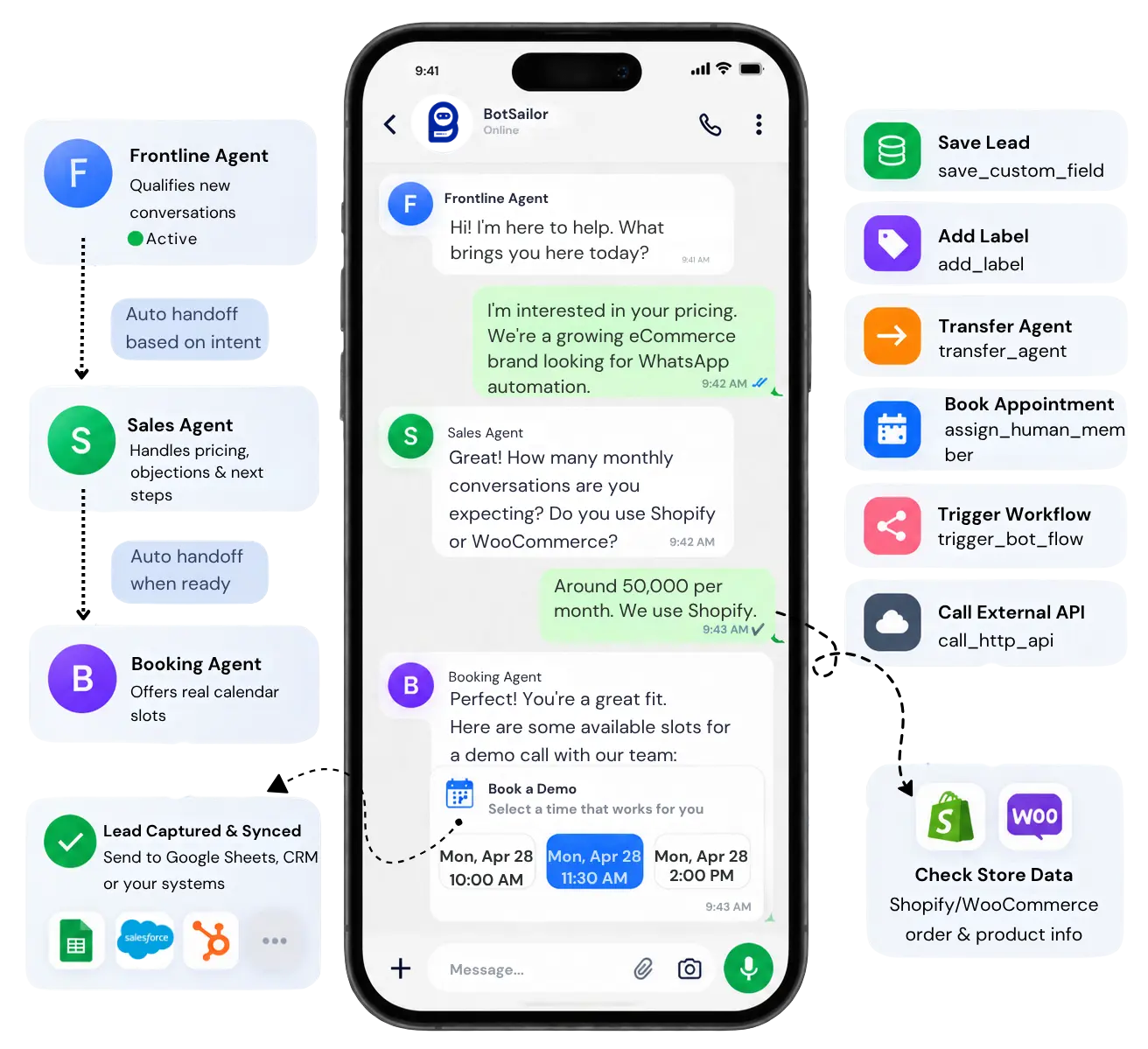
This is the core of the platform: configure multiple active AI agents, each with its own role, and let them hand off automatically — smart departmental routing, without a dispatcher. It’s AI lead qualification built as a team, not a single overloaded script.
Frontline Agent
Greets every conversation, asks qualifying questions, and reads intent before anyone else gets involved — automated lead qualification from the very first message.
Sales Agent
Takes over once intent to buy is confirmed — pricing, objections, and next steps, handled by a specialist built for AI sales automation.
Booking Agent
Steps in the moment a lead is ready to talk to a person — offering real calendar slots, no back-and-forth.
Each agent is enabled independently under Agent Configuration, with routing rules deciding which one a conversation reaches first — and ##transfer_agent## handling every handoff after that. Unlike a scripted lead qualification chatbot, every agent here reasons about the conversation instead of matching keywords.
The system prompt engine behind every qualifying question
This is what makes it lead qualification software rather than a static form: the agent doesn’t just talk — it executes real actions mid-conversation, written directly into the system prompt as ##action_name## : id. Type ## in the prompt box to autocomplete any of these from a picker; the interface shows names, the prompt stores the numeric ID underneath.
Capture & Score the Lead
##save_custom_field## : 42Save what the lead tells you to a custom field.
##add_label## : 12Tag the conversation — hot-lead, budget-confirmed, and more.
##remove_label## : 12Remove a label when the signal no longer applies.
Nurture Automatically
##assign_sequence## : 8Move a qualified lead into a follow-up sequence.
##trigger_bot_flow## : 15Trigger a bot flow built in the visual flow builder.
##remove_sequence## : 8Stop a previously assigned sequence.
Call Any External System
##call_http_api## : 5 | reply_with_response | status, messagePush a captured lead to a CRM, then reply using response fields.
##call_http_api## : 5 | reply_with_static_replyCall an HTTP API, then send a fixed customer reply.
##call_http_api## : 5 | no_replyCall a webhook silently — nothing sent to the lead.
Hand Off the Warm Lead
##transfer_agent## : 18Route the conversation to another AI agent.
##assign_human_member## : 335Always assign to one specific teammate.
##assign_human_role## : 3Round-robin across a team role.
Check Store Data Mid-Chat
##shopify_store## / ##woocommerce_store## : 12Bind a connected store — required before any store action.
##shopify_get_order_details##Look up order status from the order number.
##shopify_recommend_products##Search and recommend products for commerce-driven leads.
Keep Conversations Clean
##mark_as_solved##Close out a finished qualifying chat.
##skip_reply##Stay silent on vague or irrelevant messages.
##block_subscriber##Block the subscriber if the message is spam.
##follow_up## : 24Set an internal staff reminder, in hours.
##add_note## : Ready for a demoLeave internal context the lead never sees.
##shopify_store## first; WooCommerce actions require ##woocommerce_store## first — other store-specific commerce actions such as ##shopify_update_order_tag##, ##shopify_cancel_order##, ##woocommerce_update_order_note##, and ##woocommerce_cancel_order## won’t save without a connected store picked first. Product and gallery images belong under Knowledge Sources (Media), never as URLs inside the prompt. Full walkthrough: how to create and configure AI agents in BotSailor. A knowledgebase that keeps every agent accurate
The system prompt controls behavior; the knowledgebase supplies what the agent actually knows — so qualifying questions get answered from real information, not a generic guess. This is what keeps lead qualification software accurate as your pricing and policies change.
Content
Paste text straight in — pricing notes, ICP criteria, or anything the agent should know verbatim.
URL
Point to a live webpage — a product page, docs site, or help article — and the agent reads it directly.
File
Upload PDFs, docs, and catalogs — the agent extracts and references the content inside them.
Media
Attach product photos and galleries here, not in the prompt — the agent sends the right image when a lead asks.
Google Sheet
Connect a live spreadsheet — pricing tables, packages, or FAQs — and updates there reflect in answers automatically.
API
Pull in dynamic external data as background knowledge — separate from ##call_http_api##, which is for real-time actions.
One Knowledge Set, reused across the team
Build a Knowledge Set once — attach URLs, files, media, sheets, and API feeds — then reuse that same set on the Frontline, Sales, and Booking agents. Update a source once, and every agent using that set answers with the change immediately. If the knowledgebase and the system prompt ever disagree, the system prompt always wins — it controls behavior, the knowledgebase only supplies information.
Attached Knowledge (3)
How AI lead scoring works, underneath the conversation
AI lead qualification isn’t just a conversation — it’s AI lead scoring running quietly in the background, turning what a lead says into a number your sales team can act on.
Signal 1
Intent
Does the message show real buying intent, or just curiosity?
Signal 2
Budget
Has a budget range been confirmed, directly or indirectly?
Signal 3
Fit
Does the lead match your ideal customer profile?
Signal 4
Urgency
Is there a timeline, or is this an open-ended inquiry?
Every signal above is captured with a system prompt action and folded into the score — this is lead scoring software with the methodology written directly into the agent’s instructions, not hidden in a black box:
##save_custom_field## : lead_score##add_label## : hot-lead##add_label## : budget-confirmed##assign_human_role## : 3Once a lead crosses your threshold, routing rules hand it to a human or an AI sales agent automatically — no one on your team has to manually re-read the conversation to decide it’s worth their time. Because the scoring logic lives in the system prompt and custom fields, it’s something you can read, adjust, and explain to your own sales team.
The human handoff: what happens after the AI qualifies a lead
Qualifying is only half the job. The moment AI lead qualification scores a lead, that context follows it straight into the Shared Inbox — so the human agent who picks it up already knows exactly where the conversation stands.
CRM Overview, updated automatically
Every signal the AI captures — lead score, deal value, pipeline stage — lands directly in the Shared Inbox’s built-in CRM Overview panel, updated live as the qualifying conversation happens.
AI Assistant — Analyze Customer Conversation
A human agent never has to re-read the whole thread first. One click on “Analyze Customer Conversation” surfaces the customer’s intent, sentiment, and a recommended next action.
Smart Conversation Helper
“Help me to reply” drafts a professional response from the customer’s latest message and the conversation history — with a Reasoning Effort control (Low to High) so the agent can dial up how much thinking goes into a tricky reply.
Customer Snapshot
Subscription status, messaging window, and opt-in source sit right alongside the conversation, so an agent knows who they’re talking to before they type a word.
Follow-up History & Notes
Every past follow-up and internal note stays attached to the conversation, so the full sales process is trackable from the very first AI-qualified message all the way to the close.
Quick Actions
A full toolbar sits on every conversation — no digging through menus for the routine parts of a handoff:
Your whole sales desk is already open beside the chat
The AI does the asking. Your team does the closing — with the owner, the notes, the CRM, the follow-up, and the next best move all sitting right next to the conversation.
Every lead, every channel — one shared inbox
WhatsApp today. Instagram tomorrow. Messenger after an ad. Leads from every channel land in a single list, so no qualified lead gets buried in the wrong app.
Built for sales teams, lead management, agencies, ecommerce, and customer support.
Step in the moment it matters. Hand it back when you’re done.
AI and your team work in the same customer journey. Take over a high-value lead without permanently switching your automation off — then let the AI carry on.
AI Agent
Answers routine questions and keeps every new lead moving.
Conversation
History, customer data, and context stay on the same thread.
Human takeover
Join Chat, then Pause Bot or Pause AI for sensitive or high-value leads.
AI resume
Resume Bot or Resume AI when your team is done — automation continues.
Join Chat: one owner, one voice
Every qualified lead has an owner, and the next agent opens the thread already briefed — instead of asking the customer to repeat everything they just told the AI.
- See who has already joined before you reply
- Join with an optional signature message
- Pause the bot or AI so the lead is never answered twice
- Switch the composer from Reply to Note and leave context the customer never sees
Pause Bot and Pause AI — independently
Take full control of a hot conversation, then resume either one when automation should take over again. You never have to permanently disable your setup.
Pause exactly what you need to, and nothing more.
Inbox IQ: know how hot a lead is before you type a word
Inbox IQ reads the latest messages and hands your agent a short summary, a lead score out of 100, churn risk, sentiment and trend, whether they’re already a customer — and one clear next action.
Asked how bot vs AI handoff works and whether a human should take over. Evaluating the product — not a casual visitor.
Lead score
78 / 100
Churn risk
12%
Next action: ask for their current inbox setup, then offer a live walkthrough.
A conversational CRM that lives beside the chat
Pipeline, stage, deal value, owner, lead score, source, and expected close sit next to the conversation — and AI can fill the deal fields straight from the chat.
Inside the 24-hour messaging window · AI can autofill this deal from the chat
Label, list, and sequence — without leaving the thread
Assign an owner, tag the lead, drop them into a list, start a message sequence, and update custom fields from the same sidebar.
Never let a hot lead go cold
Set a follow-up right from the inbox with a date and time, a reason, and an internal note. Quick options keep the common reminders one tap away.
Don’t just answer leads. Move them forward.
Sales, support, and automation happen in the same thread — so one reply can become a deal update, a follow-up, or a bot flow, with zero switching between tools.
Qualify the lead
Open Inbox IQ for score, intent, and sentiment. See the source and whether they’re already a customer.
Update the CRM
Move the stage and set the deal value. Assign an owner and add a label.
Schedule the follow-up
Set a time, a reason, and an internal note — or start a sequence from the same sidebar.
Close the deal
Send a canned reply, flow, or template — and keep the next action on this conversation.
Canned Replies
Type / and the reply is already written. Saved team answers — pricing, onboarding, support links — go out in one keystroke.
Send a Flow — Now or Later
Send a bot flow, message template, or WhatsApp Flow into the conversation immediately, or schedule the same one for the follow-up window you choose.
Translate & AI Rewrite
Translate the reply you’re about to send, or rewrite it before it goes out — so every lead gets a clear answer they can actually understand.
Shopify & Woo Orders
See live order status in the conversation instead of opening the store admin.
Google Meet
Create a meeting link on the subscriber and send it without leaving the inbox.
File Attachments
Share files — proposals, brochures, price lists — from the composer in the same live conversation.
Mine, Unread, Important, Resolved
Filter the queue the way a real sales desk works — not one endless, unowned list.
Installable Inbox (PWA)
Install Shared Inbox on a phone or laptop and get a web push the moment a hot lead needs you.
This is what separates AI lead qualification from a bot that just forwards a transcript: the AI hands off a scored, summarized, context-loaded lead, and a human agent picks up already knowing exactly where to take the conversation next. Explore Shared Inbox
Everything else that comes built into BotSailor
The AI agent is the core, but it runs inside a full platform built for AI lead generation, capturing, syncing, and nurturing leads end to end.
WhatsApp Flows
Native in-chat forms that collect structured data — name, budget, requirement — without the lead ever leaving the conversation.
Native Appointment Booking
The moment a lead is qualified as high-intent, the agent offers real calendar slots inside the chat.
User Input Flows
Conversational data gathering — one clear question at a time, the way a real qualifying conversation actually flows.
Google Sheets Sync
Every qualified lead lands in a live spreadsheet your team can already see, with zero manual entry. See how it connects →
Click to WhatsApp Ads
Run ads that open directly into a qualifying conversation, not a landing page — AI lead generation that skips the form entirely. See how CTWA works →
Website Chat Widget
Capture visitors the moment they land on your site, before they ever think to look for a contact form.
Automated Follow-Ups
Pre-approved WhatsApp message templates revive leads who went quiet — sent automatically, right on schedule.
WhatsApp Broadcasting
Reach your entire qualified list at once when there’s news, an offer, or a launch worth sending. Explore broadcasting →
Shared Inbox
Every handoff from an AI agent lands in one organized workspace your whole team can work from. See Shared Inbox →
Why speed and channel actually matter
Responding to a lead within 5 minutes increases the odds of qualifying them by 21x — yet the average B2B response time is 42 hours.
Harvard Business ReviewOver 40% of high-intent leads arrive outside standard business hours — when most teams simply aren’t watching the inbox.
WhatsApp has a 98% open rate, making it exponentially more effective than traditional email or web forms.
Frequently asked questions
Everything people ask before deploying AI lead qualification across a real sales team — sorted by topic.
AI lead qualification is the process of an AI agent reading an inbound conversation, asking the right questions, and deciding how good a lead actually is — without a human reviewing every message first. Instead of a static form, it works like an AI digital employee for sales lead qualification: always on, always asking the same disciplined questions, every single time.
A basic lead qualification chatbot matches keywords to scripted replies. This is AI lead qualification built on genuine reasoning — the agent understands intent, holds context across the conversation, and takes real actions like scoring, tagging, and routing, instead of just returning a canned line.
Think of it less as a replacement and more as an AI digital employee for sales lead qualification that handles the repetitive first pass — greeting, qualifying questions, scoring — so your human SDRs only spend time on leads that are already confirmed as worth it.
Yes — that consistency is the entire point. Over 40% of high-intent leads arrive outside standard business hours, and AI lead qualification doesn't take evenings or weekends off; it qualifies the moment a lead messages, then hands off to a human when your team is back online.
AI lead generation is about getting the conversation started — Click to WhatsApp Ads, a website widget, a QR code. AI lead qualification takes over the moment someone replies, asking the questions that turn a raw inquiry into a scored, sales-ready lead.
It's genuine lead qualification AI — the agent interprets open-ended answers and decides its own next question, rather than following a fixed decision tree. Simple automation, like a follow-up reminder, can run alongside it, but the qualifying conversation itself is reasoning, not a script.
Yes — Click to WhatsApp Ads or your website widget can generate the conversation, and the same number's Frontline Agent immediately starts AI lead qualification the moment someone replies, so a lead never has to restart in a separate tool.
AI lead scoring is the process of turning what a lead says — their intent, budget, fit, and urgency — into a number or tag your sales team can act on immediately, instead of everyone guessing which conversations matter most.
It's built from four signals captured during the conversation — intent, confirmed budget, fit against your ideal customer profile, and urgency — each saved with ##save_custom_field## and ##add_label##. Because the AI lead score calculation methodology lives in the system prompt, you can read and adjust exactly how it's weighted.
It's lead scoring software in the sense that the scoring logic, labels, and thresholds are configurable inside the platform — no separate scoring engine to buy or maintain, and no data science team required to stand it up.
Custom fields, labels, and routing rules are the core AI tools lead scoring relies on here — a lead's score can trigger a label like "hot-lead," which then triggers a routing rule, which then triggers a handoff, all inside the same system prompt.
Yes — since the scoring rules are written in plain language in the system prompt rather than buried in a fixed model, adjusting how much weight urgency or budget carries is a matter of editing the instructions, not retraining anything.
It updates as the conversation happens — each ##save_custom_field## and ##add_label## action fires the moment a signal like budget or urgency comes up, so a lead's score and labels are current the instant a routing rule needs to check them, not calculated after the fact.
The Frontline Agent handles initial AI lead qualification — greeting, questions, scoring. An AI sales agent takes over once intent to buy is confirmed, handling pricing, objections, and next steps as a specialist, rather than one generalist agent trying to do both roles at once.
Both — the AI sales automation handles the repetitive parts of the conversation (answering pricing questions, checking availability, booking a call), while ##assign_human_member## or ##assign_human_role## brings in a real person for the actual close.
Yes — configure separate AI sales agent instances, each with its own system prompt and pricing knowledge, then use routing rules to send a conversation to the right one based on product line, language, or region.
The current agent triggers ##transfer_agent## to hand the conversation to another AI agent — for example, the Frontline Agent transferring a budget-confirmed lead straight to an AI sales agent, without the lead repeating anything they've already said.
Yes — offering real calendar slots the moment a lead is ready is one of the highest-leverage forms of AI sales automation, since it removes the multi-day back-and-forth that usually happens over email just to schedule a call.
Both — once the Frontline Agent hands off a budget-confirmed lead, the AI sales agent is built to work through pricing questions and common objections as part of AI sales automation, not just recite a price list.
It's lead qualification software at its core, but it sits inside a broader platform — knowledgebase, Shared Inbox, broadcasting, flows — so qualification isn't an isolated tool bolted onto your stack, it's connected to everything downstream of it.
Automated Follow-Ups is a clean example — pre-approved WhatsApp templates automatically re-engage a lead who went quiet, on a schedule you set, without anyone on your team remembering to follow up manually.
No — automated lead qualification here means writing plain-language instructions plus ##action## tags chosen from autocomplete. No code is required to configure scoring, routing, or handoff.
Yes — ##call_http_api## pushes a captured, scored lead straight to a CRM or webhook mid-conversation, and Google Sheets Sync offers a zero-setup alternative if you don't have a CRM yet.
Whatever gets saved via ##save_custom_field## — including the lead score — can be pushed out through ##call_http_api##, so downstream systems see the same score your routing rules are acting on.
Yes — WhatsApp Flows lets the agent drop a native in-chat form into the conversation for structured fields like name or budget, so automated lead qualification isn't limited to free-text answers when a form is faster for the lead.
Both are connected — the moment lead qualification automation confirms high intent, the Booking Agent can offer real calendar slots in the same conversation, so qualifying and scheduling happen without switching tools.
Yes — use Join Chat to step in. The thread shows who has already joined, and you can add an optional signature message so the lead knows who they're talking to. Then use Pause Bot or Pause AI so the lead isn't answered twice, and resume either one when you're done.
They're two independent controls. Pause Bot stops your automated bot flows; Pause AI stops the AI agent's replies — so you can pause just one or both while your team handles a sensitive or high-value lead. Resume Bot and Resume AI switch each one back on, with no need to permanently disable your setup.
Inbox IQ reads the latest messages on a thread and gives your agent a short summary, a lead score out of 100, churn risk, sentiment and trend, whether the person is already a customer, and one recommended next action — coupon, escalate, upsell, or an information request. Your agent knows how to open the conversation before typing a word.
The Shared Inbox includes a lightweight conversational CRM beside every chat: pipeline, stage, deal value, owner, lead score, source, and expected close. AI can autofill the deal fields from the conversation, and you can open the Kanban board without leaving the inbox. If you already use an external CRM, ##call_http_api## can still push the same lead data out.
Yes — conversations from all five channels land in one shared inbox. Your sales and support team work from a single queue, with filters like Mine, Unread, Important, and Resolved, instead of juggling five separate apps and losing leads between them.
Set a follow-up right from the conversation with a date and time, a reason, and an internal note — or tap a quick option like 1 Hour, 4 Hours, or 1 Day. You can also start a message sequence, type / to send a saved canned reply, or send a bot flow, template, or WhatsApp Flow now or scheduled for later, all from the same thread.
Most teams have a single Frontline Agent qualifying real conversations within the same day — connect a channel, write the system prompt, enable the agent. Scoring, multi-agent routing, and CRM integration can be layered in afterward.
No — the entire AI lead score calculation methodology is configured through the system prompt and custom fields inside the platform. No separate scoring model, no engineering ticket required.
It escalates — ##assign_human_member## or ##assign_human_role## hands the conversation to your team, with ##add_note## capturing context so whoever picks it up isn't starting cold.
Often more so — a small team feels a slow response the most. An AI digital employee for sales lead qualification means no lead waits on one person's calendar, and the team only spends time on conversations already confirmed as worth having.
Talk to a lead qualification expert
Agent prompts, scoring rules, or multi-agent routing — we can help you go live.
Complete setup guideContact UsConfigure your first AI Agent team today.
Your AI digital employee for sales lead qualification, qualifying and routing leads on the channels your customers already use.