
Sales Agent
Product questions, pricing, and recommendations

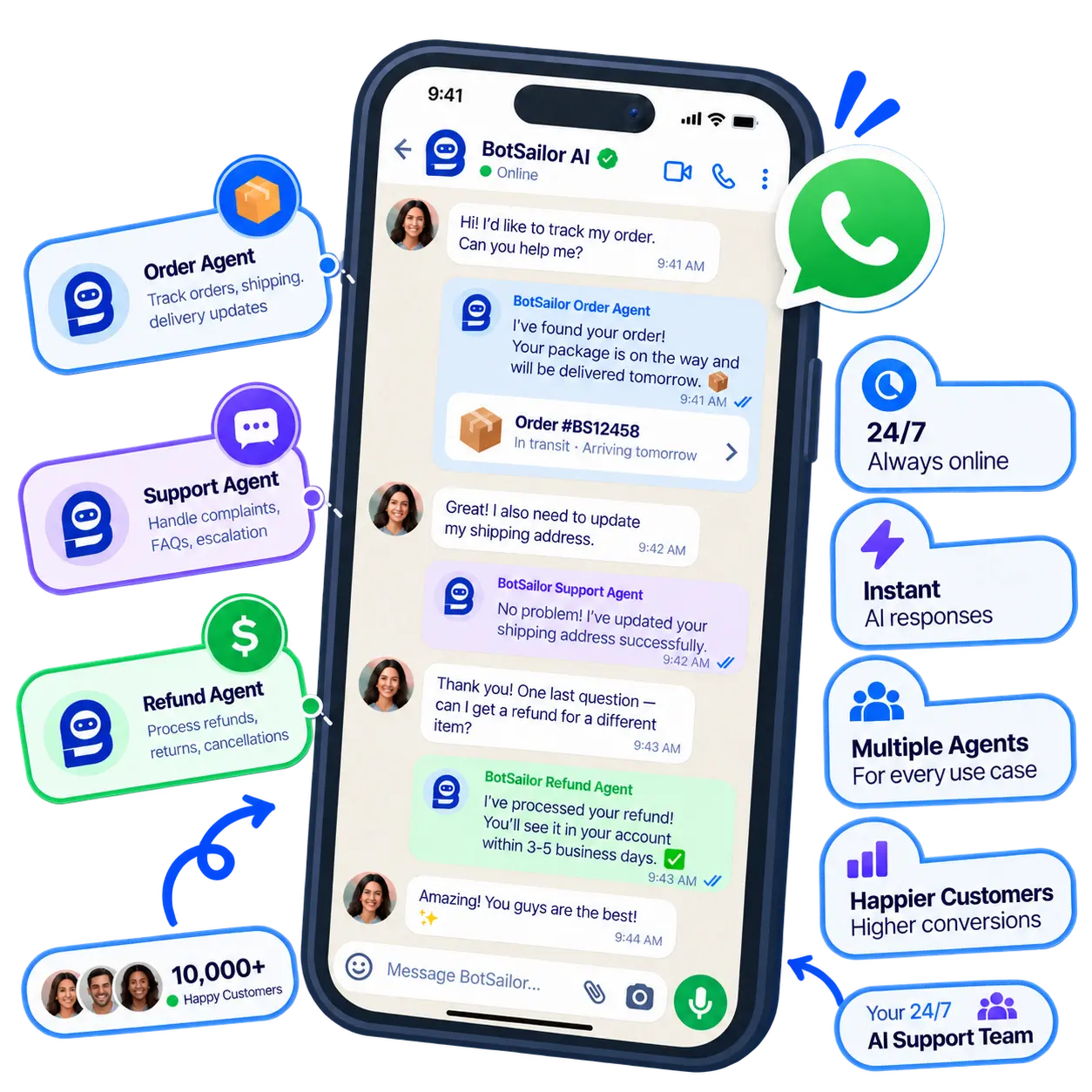
Every unanswered message is a customer deciding whether to wait or walk away. This is exactly the gap an AI agent for customer service is built to close.
Still waiting on a reply.
Answered instantly, 24/7 customer support ai on duty.
Three steps, and conversational AI for customer service is answering real customers.
Bring in WhatsApp, your website widget, and your store or CRM — plus any ai agent integrations you already rely on, like an HTTP API or CRM webhook.
Describe the agent’s role in plain language, then drop in actions using ##action_name## : id — type ## to autocomplete labels, sequences, and connected stores. The complete setup guide walks through every field.
Your AI customer service agent starts answering, tagging, and routing conversations immediately — no code, no waiting.
A customer service AI agent is only as good as what it can actually do. Here’s what runs under the hood.
Unlike a rigid keyword bot, this AI-powered customer support agent reads what a customer actually means and decides the right next step — answer, escalate, or look something up live.
##call_http_api## : 5 | reply_with_response | status, messageUpload FAQs, docs, and product media — the agent answers from them and can even send saved images when asked.
Hands off to a specific teammate or round-robins across a team role, exactly when a conversation needs a person — straight into your shared inbox.
##assign_human_role## : 3Skips vague messages, blocks spam, and only pings your team when a real follow-up is genuinely needed.
##skip_reply## · ##block_subscriber##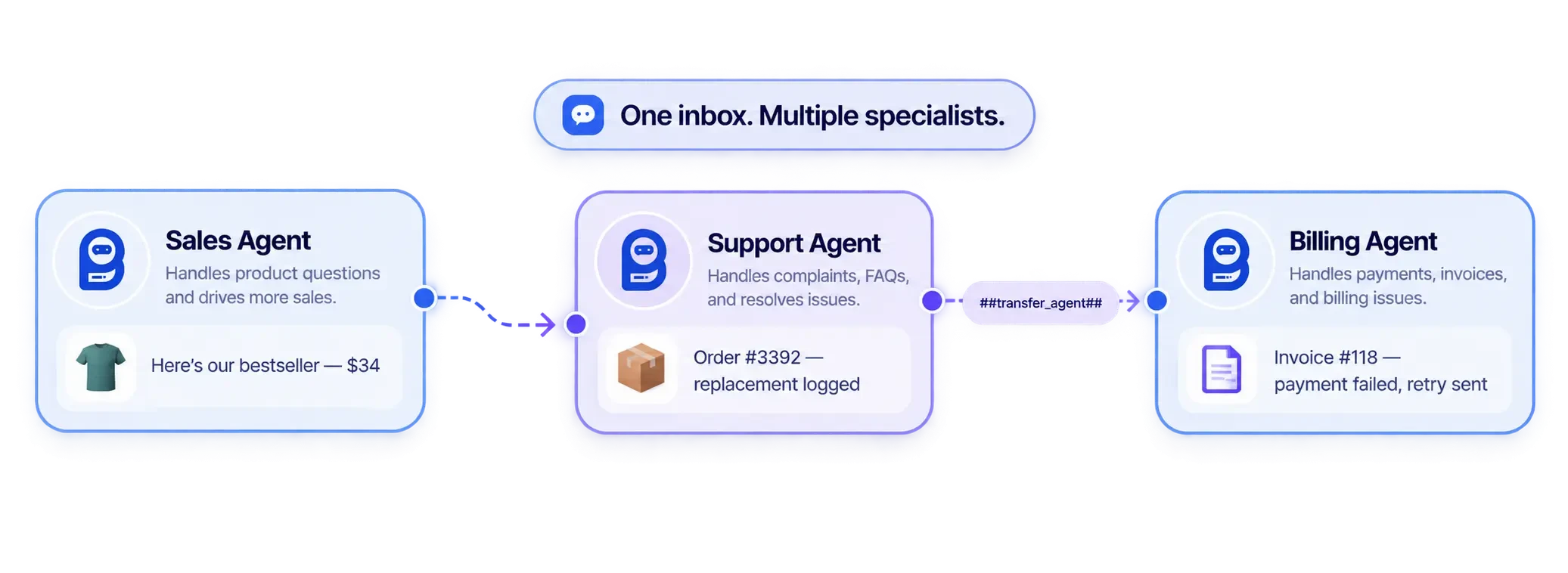
Written directly inside the System Prompt as ##action_name## : id — type ## to autocomplete. The interface shows readable names; the prompt stores the numeric ID underneath.
##add_label## : 12Add a label to the conversation.
##remove_label## : 12Remove a label.
##assign_sequence## : 8Assign a follow-up sequence.
##save_custom_field## : 42Save a custom field on the contact.
##call_http_api## : 5 | reply_with_response | status, messageCall an HTTP API, then reply using selected response fields.
##call_http_api## : 5 | reply_with_static_replyCall an HTTP API, then send a fixed customer reply.
##call_http_api## : 5 | no_replyCall an HTTP API silently — no customer message.
##shopify_store## / ##woocommerce_store## : 12Bind a connected store — required before any store action.
##shopify_get_order_details##Look up order status from the order number.
##shopify_recommend_products##Search and recommend products.
##shopify_cancel_order##Cancel an order when the customer asks.
##assign_human_member## : 335Always assign to one specific teammate.
##assign_human_role## : 3Round-robin across a team role.
##trigger_bot_flow## : 15Trigger a bot flow or postback built in the visual flow builder.
##transfer_agent## : 18Hand off to another AI agent.
##mark_as_solved##Close out the conversation once resolved.
##skip_reply##Stay silent on vague or irrelevant messages.
##block_subscriber##Block the subscriber if the message is spam.
##follow_up## : 24Set an internal staff follow-up reminder, in hours.
##add_note## : Customer wants a callbackSave a note in the shared inbox — never sent to the customer.
##remove_sequence## : 8Remove a previously assigned sequence.
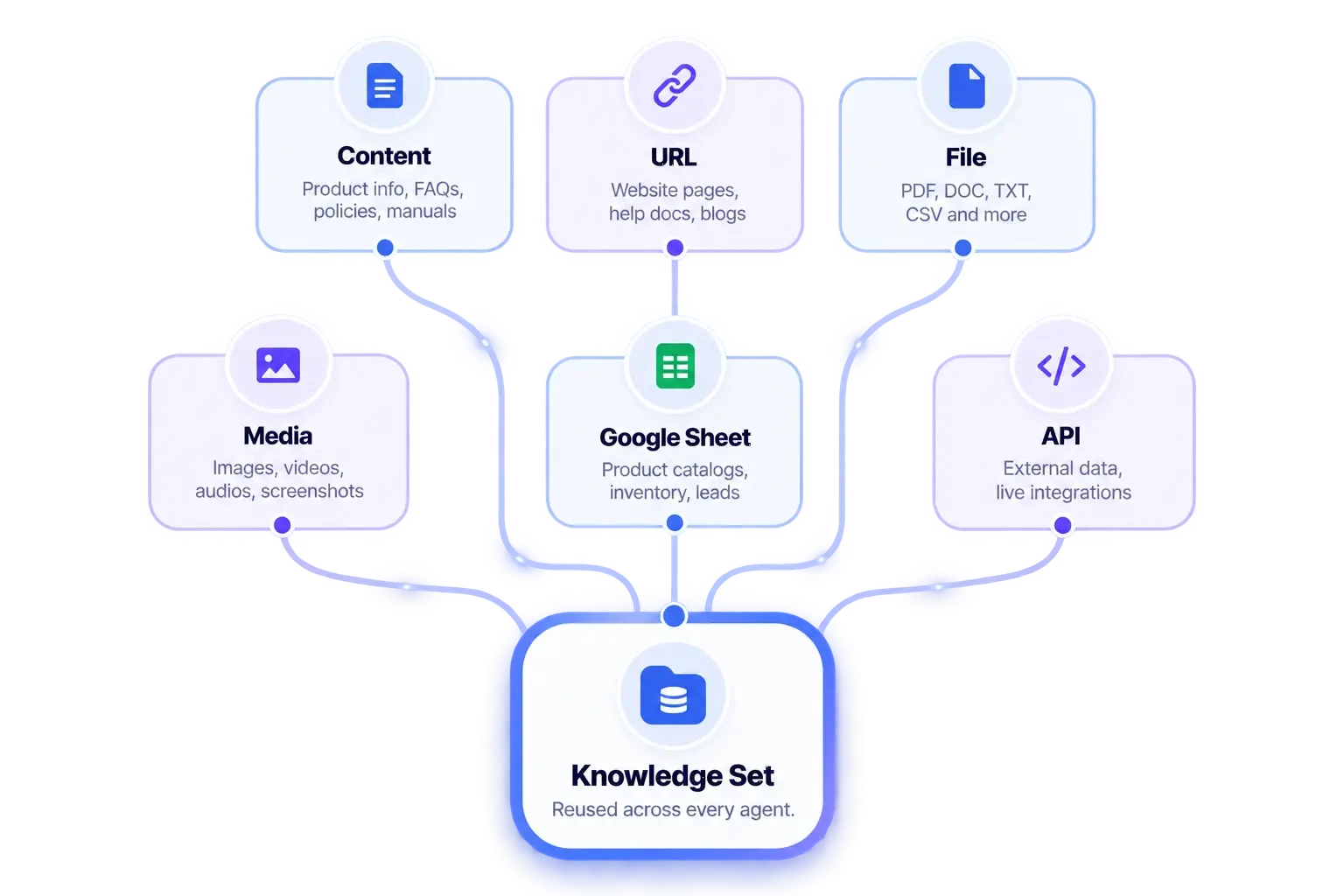
##shopify_store## first; WooCommerce actions require ##woocommerce_store## first — pick a connected store, or those tags won’t save. Image URLs don’t belong in the prompt; add product and gallery images under Knowledge Sources (Media) instead, and the agent will send them when asked. Full walkthrough: how to create and configure AI agents in BotSailor. See Shopify on WhatsApp or WooCommerce on WhatsApp.Actions tell the agent what it can do. Knowledge Sources tell it what it knows — six ways to feed real information into a reusable Knowledge Set, so answers stay accurate without rewriting the prompt every time something changes.
Paste text straight in — policies, service details, or anything the agent should know verbatim, without needing a separate file.
Point to a live webpage — a blog post, docs page, or help article — and the agent reads it directly as a source.
Upload PDFs, docs, and spreadsheets directly — the agent extracts and references the content inside them.
Attach product photos and galleries here, not in the prompt — the agent sends the right image the moment a customer asks for one.
Connect a live spreadsheet — pricing tables, inventory, or FAQs — and updates there reflect in the agent’s answers automatically.
Pull in dynamic external data as background knowledge — separate from ##call_http_api##, which is for real-time actions, not standing information.
Build a Knowledge Set once — like “Agency-setup Knowledge” — attach content, URLs, files, media, sheets, and API feeds to it, then reuse that same set across every agent that needs it. Update a source once, and every agent using that set answers with the change immediately, no prompt edits required.
Attached Knowledge (3)
The agent draws on all attached sources together to answer — it isn’t limited to just one.
A single customer service AI agent handling billing, product questions, and technical issues gets muddled fast. Specialize instead — conversational AI for customer service works best when each agent has one clear job.
Product questions, pricing, and recommendations
Tickets, order issues, refunds, complaints
Invoices, payment failures, plan changes
Routing rules under Agent Configuration decide which agent answers a given message. Mid-conversation, an agent can hand off with ##transfer_agent## : 18 — for example, a Sales Agent transferring a billing dispute straight to the Billing Agent, without the customer repeating themselves.
The pieces that turn a demo into AI customer service software you can run a real team on — the same AI tools for customer support that keep conversational AI for customer service accurate as your catalog and policies change.
FAQs, help docs, and product media live here. The agent answers from them directly and can attach the right image when a customer asks for photos — no image URLs pasted into the prompt.
Tag conversations and enroll contacts into follow-up sequences automatically, so your CRM stays organized without manual tagging — and those same segments feed WhatsApp broadcasting campaigns.
##save_custom_field## captures structured details — order size, plan tier, preferred language — straight from the conversation.
Connect any external system with ##call_http_api##, choosing whether the customer sees the live response, a fixed reply, or nothing at all.
Support volume keeps climbing while headcount stays flat. The research below shows where AI customer service software actually closes that gap — and the one thing that separates agents that resolve issues from bots that only reply.
The distance between 14% today and Gartner’s 80% projection is action-taking. An agent that can only retrieve an answer deflects; one that can look up an order, write a custom field, and update a system resolves. That’s the line BotSailor’s AI agents are built on.
Around 60% of customers define an “immediate” response as ten minutes or less, and on WhatsApp the expectation is tighter still. Instant first replies — plus WhatsApp broadcasting for proactive updates — keep you inside that window without a night shift.
Consumer research consistently shows people still want a human available for sensitive cases. The metric that matters isn’t “no humans” — it’s how cleanly the agent hands off. A shared inbox with notes attached means the teammate picking up never starts cold.
Sources: Gartner customer service and support research; Salesforce State of Service; Infobip messaging benchmarks. Figures are industry-wide benchmarks, not BotSailor performance claims — your own results depend on ticket mix and how deeply the agent is integrated.
Everything people ask before deploying AI customer service across their team — sorted by topic.
An AI customer service agent is conversational AI for customer service that reads what a customer means, not just the words they type, and decides what to do about it — answer from your knowledge base, look up a live order, save a detail to a custom field, or hand the conversation to a human. It's the difference between a keyword bot and genuine AI customer service.
A basic chatbot matches fixed keywords to canned replies. This is conversational AI for customer service — it understands intent, holds context across a conversation, and can take real actions like tagging a contact, calling an external API, or escalating to a teammate, instead of just returning a scripted line.
It combines AI customer service with real operational actions — order lookups, CRM tagging, HTTP API calls, and human handoff — in one system prompt, instead of forcing you to stitch together separate tools. That combination is what makes it AI customer service software teams can actually run production support on, not just a demo.
Yes — the same underlying customer service ai agent can be configured as an AI Sales Agent, a Billing Agent, or a Lead Qualification Agent, since its behavior comes entirely from the system prompt and the actions you give it, not from separate software.
It's genuine AI-powered customer support — the agent interprets open-ended messages and decides its own next step, rather than following a fixed decision tree. Simple automation (like an abandoned-cart reminder) can run alongside it, but the agent itself is reasoning about each conversation.
Yes — that consistency is the point of 24/7 customer support ai. Human assignment still respects the business hours you configure, but the AI customer service agent itself answers, tags, and routes conversations around the clock, every day of the week.
Write them directly in the prompt using ##action_name## : id. Type ## to trigger autocomplete and pick a label, sequence, or connected resource from the list — the interface shows readable names, but the prompt itself always stores the numeric ID underneath. The complete AI agent configuration guide covers each action with examples.
reply_with_response replies using specific fields from the API's response; reply_with_static_reply sends a fixed message regardless of what the API returns; no_reply calls the API silently, with nothing sent to the customer. This is one of the most flexible ai agent integrations available in the system prompt.
##save_custom_field## : 42 writes a value to a custom field on the contact — useful for capturing plan tier, preferred language, or order size directly from the conversation, without a human typing it in manually.
Yes — ##skip_reply## tells the agent not to respond to a vague or irrelevant message, and ##call_http_api## : 5 | no_reply lets it call an external system in the background with no customer-facing message at all.
Instruct the agent to use ##block_subscriber## only when a message clearly matches spam patterns you define in the prompt, and ##skip_reply## for anything merely low-value — that distinction keeps a real AI agent for customer service from mistakenly blocking a genuine customer.
Yes — ##add_note## : Customer wants a callback saves an internal note visible only to your team in the shared inbox, and ##follow_up## : 24 sets a staff reminder a set number of hours from now.
Yes — build separate specialists such as a Sales Agent, a Support Agent, and a Billing Agent, each with its own system prompt and actions, then enable them together under Agent Configuration with routing rules deciding who answers what.
Routing rules match the topic of an incoming message — billing, product questions, technical issues — to the right specialist. An agent you've created but not enabled under Agent Configuration simply won't be part of that routing.
The current agent can trigger ##transfer_agent## : 18 to hand the conversation to another AI agent — for example, a Support Agent transferring a pricing question straight to Sales — without the customer having to repeat their issue.
##transfer_agent## moves the conversation to another AI specialist. ##assign_human_member## or ##assign_human_role## hands it to an actual person in your shared inbox — one specific teammate, or a round-robin across a team role — typically once the customer explicitly asks for a human.
Yes — ##mark_as_solved## closes the conversation once the agent judges the issue resolved, keeping your inbox from filling up with tickets that were actually answered.
Anything reachable over HTTP — your CRM, a Shopify or WooCommerce store, a custom internal tool — connects through ##call_http_api## or a dedicated store action, making this one of the more open ai agent integrations available without custom development.
Both. It's built as ai chatbot software for customer support out of the box, but the same agent framework — system prompt plus actions — configures just as easily into a Sales Agent or a Lead Qualification Agent. For non-AI journeys, the visual flow builder handles scripted sequences alongside the agent.
Under Knowledge Sources (Media), not inside the prompt — pasting image URLs directly into the system prompt isn't supported. The agent pulls from that media library and sends the right image when a customer asks for photos.
No — bind the store once with ##shopify_store## or ##woocommerce_store##, then every order-lookup, product-recommendation, and cancellation action becomes available. Other store actions simply won't save until that binding is in place. See the setup for Shopify with WhatsApp and WooCommerce with WhatsApp.
Yes — labels, sequences, custom fields, and follow-up reminders all work alongside the agent, so the broader set of AI tools for customer support covers CRM organization and internal workflow, not just the conversation itself. WhatsApp broadcasting handles the proactive side.
No. Connecting a channel takes a few clicks, and the system prompt is plain instructions plus ##action## tags picked from autocomplete — no coding required to deploy AI customer service on your team's behalf.
Yes — many teams start with a single AI customer service agent answering FAQs, then add order lookups, HTTP API calls, and a second specialist agent once the first one is proven out.
It escalates — using ##assign_human_member## or ##assign_human_role## to hand the conversation to your team, with ##add_note## capturing context so the person picking it up isn't starting cold.
Yes, when it's configured with clear escalation rules. Treat customer support agent ai as the first line of response — resolving the repetitive, well-documented questions instantly — while genuinely complex or sensitive cases route straight to a human, which is exactly what the routing and handoff actions above are built for.
Agent prompts, knowledge sources, or multi-agent routing — we can help you go live.
Complete setup guideContact UsResolve tickets, answer FAQs, and escalate the ones that matter on the channels your customers already use.