#2343-WhatsApp Webhook (in-bound) Workflow Issue
Hello team,
WhatsApp Webhook (in-bound) Workflow Send message based on conditions not working.
i tried Send message only if any of the following rules satisfies using all operator but getting same error.
Example > i am sending data on in-bound webhook sent data as tag > new once and then tag > old. i added condition if tag=new then trigger,
but on new and old both it's trigger.
so please resolve ASAP because all client's getting charged for utility/marketing msg and creating wrong impression.
Thanks

I'm having the same problem; I had to use another tool to do something that already exists.
Maxs
Dear User,
The webhook workflow feature is working correctly on BotSailor. It’s possible there may be a configuration issue in your setup. Please open a support ticket and include the following details:
**Your login credentials
**The specific webhook that is not working
**The conditions and steps you have used in the workflow
Once we have this information, we will be happy to check and resolve the issue for you.
Thank you.
Best regards,
Kamrul Hasan
Kamrul Hasan
GM kamrul bhai am raising ticket and sharing you video soon.
thanks
Maxs
Dear User,
If you are still facing the issue, please open a support ticket. If the issue has been resolved on your end, kindly let us know.
Thank you.
Best regards,
Kamrul Hasan
Kamrul Hasan
Seems issue resolved... you can consider resolve tag.
thanks
Dear Bs team,
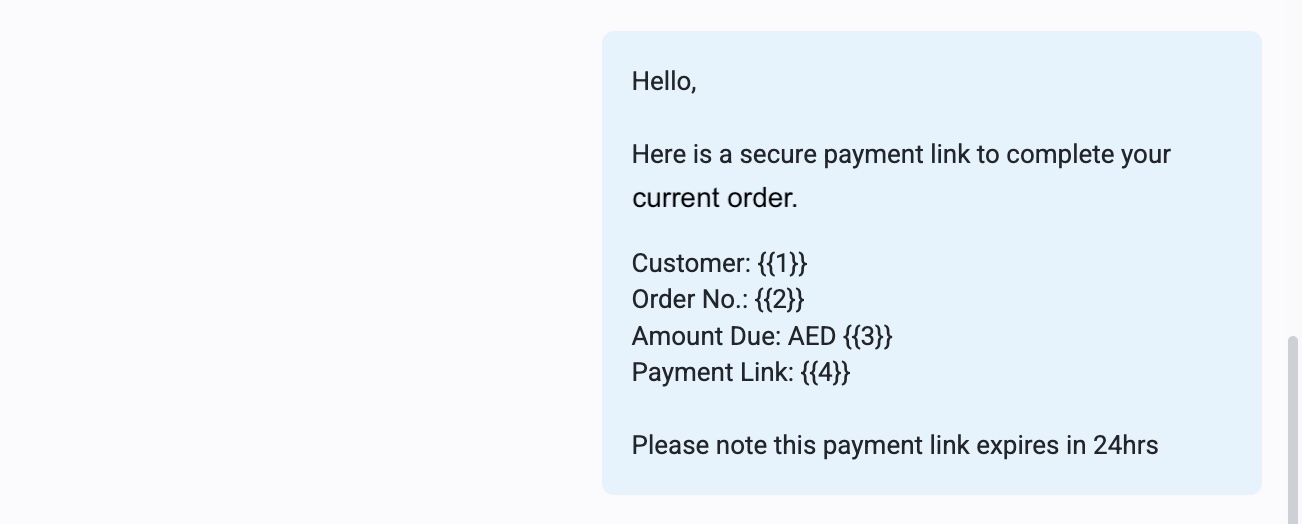
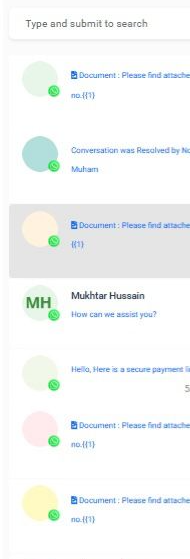
Could you please clarify the issue we are using webhook to send message from our system and you can see the below template variables its not showing us the exact content customer received how to fix this issue ?

PrimeX Group
Dear user,
Have you mapped these with BotSailor variable? If you have mapped the message templates with BotSailor variable and if the variable has the data, it should show data on the shared inbox. If you think you have an issue please open a ticket to our support desk with your login credentials.
Thank you.
Kamrul Hasan
Thanks Kamrul Hasan for the response yes everything mapped with botsailor end i have raised the ticked for the same to rectify the issue I need clarity on a conflict between your guidance and the support team.
I checked in the Shared Inbox and the Live Chat section. The data is not visible in both places.
Your guidance on the forum states that if the template is mapped correctly and the variable has data, it should show in the Shared Inbox. Farhan from the support team informed me that it is not possible to view the values on my side and that only the customer can see them.
Both statements do not match. I need confirmation on the correct behavior.
Kamrul Hasan
If we send from shared inbox then it's not showing data value
Maxs
Actually i have not even send from live chat or shared inbox its send using webhook
The Variable data is not visible to us in the chat window - this is an old issue - already raised concern earlier too. BS team needs to fix this
PrimeX Group
We will investigate the issue in detail, and if identified, we will resolve it as soon as possible. Our team will ensure that the fix covers all scenarios, including messages sent from the Shared Inbox, webhooks, and broadcasting.
Thank you.
Best regards,
Kamrul Hasan
Kamrul Hasan
Hello Kamrul Hasan what is the timeline to resolve this issue? It has been a month and the issue is still not resolved
Kamrul Hasan
still issue there also make sure variable visible if sent via rest api.. and i found another issue when we use custom field in template as variable and send message via webhook it's not saving data in cf.
so please fix this ASAP.
Thanks
Maxs
You are right i have raised this as well even when using the endpoint API, if multiple messages are pushed they do not reflect in the chat If they do appear, the names do not show and after a refresh the messages are gone