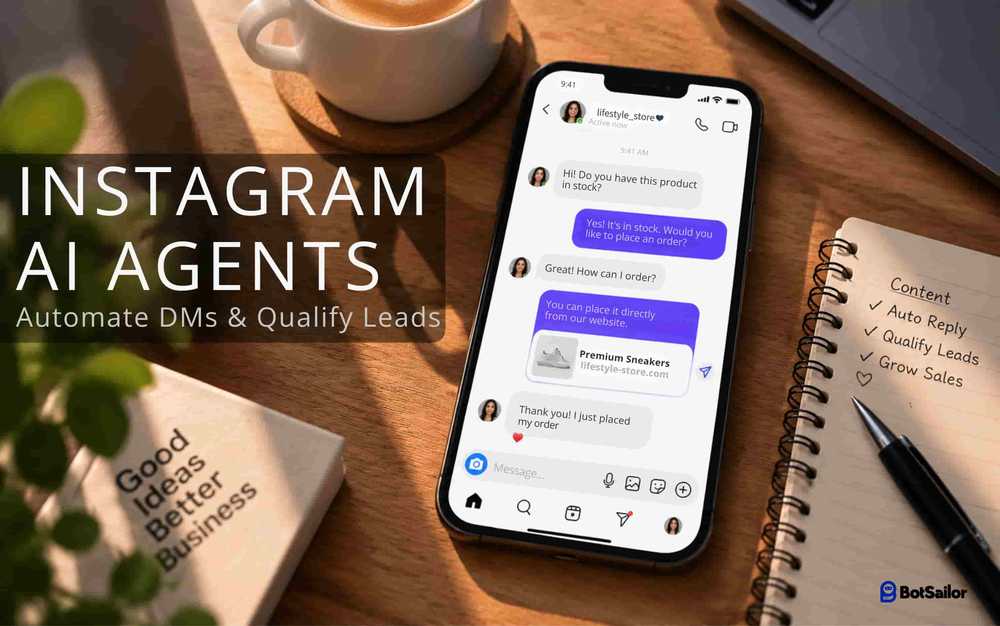
Instagram DMs move fast — and most businesses still handle them manually. A follower comments on a reel, slides into DMs, asks about pricing, and if no one replies within minutes, that lead is gone. Manual DM management doesn't scale, and generic auto-responders that just echo a canned "Thanks for reaching out!" message don't qualify anyone — they just delay the inevitable human reply.
The shift happening now is toward autonomous AI workforces: specialized AI Agents that read intent, ask the right questions, capture lead details, and route high-intent buyers to a human — all without a person touching the conversation until it's actually ready to close. This is what BotSailor's AI Agent system enables on Instagram, and this guide shows you exactly how to build a full three-agent team that runs side by side.
Why Instagram DMs Need Specialized AI Agents

A single "do everything" chatbot breaks down fast on Instagram. The same inbox has to handle:
- Cold "hi" messages from comment-triggered automations
- First-time leads who need qualifying before anyone talks pricing
- Genuine product and pricing questions from people ready to buy
- Post-purchase questions — order status, complaints, refunds
Forcing one monolithic Instagram bot to handle all four means it either over-triggers or under-delivers. BotSailor solves this with multi-agent routing: For this demonstrations, we will show, three specialized agents, each owning one job, working together on the same Instagram inbox.(BotSailor supports up to 10 multi AI Agents, that can work simultaneously, side by side),
Lead Qualification Agent
Handles top-of-funnel DM traffic and collects contact details
Sales Agent
Answers product/pricing questions and pushes qualified leads toward a purchase
Support Agent
Takes over after purchase for order status, complaints, and refunds
Routing rules and intent mapping decide which agent replies to which message, and agents hand conversations off to each other as the customer's intent evolves.
Creating and Configuring Three Agents on Instagram
Each agent is created the same way — go to Dashboard → Chatbot Manager → AI → Agents → Create Agent — but configured for a distinct job.
1. Lead Qualification Agent
Name: IG Lead Qualification Agent
Slug ig-lead-qualification-agent
Description: Qualifies Instagram DM leads and collects contact details
Knowledge: General FAQs, pricing tiers overview
2. Sales Agent
Name: IG Sales Agent
Slug ig-sales-agent
Description: Answers product/pricing questions for qualified leads, pushes toward purchase
Knowledge: Full product catalog, detailed pricing, promotions
3. Support Agent
Name: IG Support Agent
Slug ig-support-agent
Description: Handles order status, complaints, and refund requests
Knowledge: Shipping policy, refund policy, order FAQs
Set all three to Active — but remember, saving an agent doesn't activate it. Each one still needs to be enabled and wired into routing rules under Agent Configuration before it can respond on Instagram.
Writing System Prompts & Actions for Each Agent
Each agent gets its own System Prompt with only the actions it actually needs — narrow scope keeps behavior predictable.
Lead Qualification Agent
            You are the Lead Qualification Agent for our Instagram page.
                  Your job is to identify serious buyers from DM conversations.Ask for the customer's name, email, budget, and requirement
                  before qualifying them as a lead.Be warm, brief, and conversational — this is Instagram, not email.Never invent pricing or availability. If you don't know an answer,
                  refer to the Knowledge Campaign.Once you have name, email, budget, and requirement, save them
                  and tag the lead as qualified, then transfer to the Sales Agent.##save_custom_field## : 42
                  ##add_label## : 12
                  ##trigger_bot_flow## : 15
                  ##transfer_agent## : 19
Sales Agent
              You are the Sales AI Agent for our Instagram page.
                  You only speak with leads that have already been qualified.Help the customer choose the right product or plan, explain
                  pricing clearly, and answer catalog questions accurately.Never invent stock, pricing, or discounts — check the
                  Knowledge Campaign before answering.If the customer is ready to buy or asks for a human,
                  assign the sales team immediately.If the customer asks about an existing order, shipping,
                  or a refund, transfer to the Support Agent.##add_label## : 14
                  ##save_custom_field## : 44
                  ##assign_human_role## : 3
                  ##transfer_agent## : 20
Support Agent
                You are the Support AI Agent for our Instagram page.
                  Help customers with order status, shipping, and refund requests.Always check the Knowledge Campaign for policy details
                  before answering a refund or shipping question.If the customer asks to cancel or return an order,
                  only proceed once the request is clearly stated.If the customer requests a human, assign the support team.
                  Mark the conversation solved once the issue is resolved.
                  Block only genuine spam — never a frustrated real customer.##save_custom_field## : 46
                  ##assign_human_role## : 4
                  ##mark_as_solved##
                  ##skip_reply##
                  ##block_subscriber##

What Each Action Does
| Action | Used By | Purpose |
|---|---|---|
##save_custom_field## | All three | Saves lead/customer data collected mid-conversation |
##add_label## | Lead Qualification, Sales | Tags subscribers (e.g., "Qualified Lead," "Hot Lead") |
##trigger_bot_flow## | Lead Qualification | Starts a nurture sequence right after qualification |
##transfer_agent## | Qualification → Sales, Sales → Support | Hands the conversation to the next specialist AI Agent |
##assign_human_role## | Sales, Support | Hands off to an available human rep on the relevant team |
##mark_as_solved## | Support | Closes out a resolved conversation |
##skip_reply## | Support | Suppresses a reply when none is needed |
##block_subscriber## | Support | Blocks genuine spam only |
Setting Up Routing to Run All Three Agents Side by Side

OpenAgent Configurationand enable all three agents on your connected Instagram channel. Then define routing rules so incoming DMs land with the right one from the first message:
| Customer Message Signal | Routed To |
|---|---|
| First-time DM, "hi," "hello," general inquiry | Lead Qualification Agent |
| Price, product, "which plan," catalog questions from a qualified lead | Sales Agent |
| "Where's my order," shipping, refund, complaint | Support Agent |
| Ready to buy / asks for a person during a sales chat | Sales Agent (Human via Sales Agent) |
| Ready to resolve / asks for a person during a support chat | Support Agent (Human via Support Agent) |

A single conversation can move through all three agents naturally:
| Conversation | Agent |
|---|---|
| "Hey, interested in your product" | Lead Qualification Agent |
| Agent collects name, email, budget, requirement | Lead Qualification Agent |
| Transfer once qualified | Sales Agent |
| "What's the price difference between the two plans?" | Sales Agent |
| "I'll take the premium one, how do I pay?" | Human (Sales) |
| [weeks later] "My order hasn't arrived" | Support Agent |
| "Can I get a refund instead?" | Human (Support) |
Keep the same guardrails regardless of how many agents are running: never let an agent transfer to itself, cap transfers at one AI-to-AI hop per customer message, and don't let a simple "hi" or "thanks" trigger a transfer at all.
Testing, Deployment & Real-World Results
With three agents live, test each handoff point, not just each agent in isolation:
| Scenario | Expected Behavior |
|---|---|
| Cold DM: "Hi" | Lead Qualification Agent replies naturally, no transfer |
| "How much for the starter package?" (unqualified) | Lead Qualification Agent begins qualification, doesn't jump straight to pricing |
| Lead fully qualified | Clean transfer to Sales Agent, no repeated questions |
| "I want to order now" (mid-sales chat) | Immediate human assignment via Sales Agent |
| "Where is my order?" (existing customer) | Routes directly to Support Agent, not Lead Qualification |
| Refund request | Support Agent checks policy, assigns human if unresolved |
| Spam / bot flooding | ##block_subscriber## triggers — never on a frustrated real customer |
| Irrelevant message | ##skip_reply## suppresses an unnecessary response |
The failure mode to watch for with three agents specifically: double transfers (Lead Qualification → Sales → back to Lead Qualification) or a customer explaining themselves twice. If either happens in testing, tighten the routing keywords or the transfer conditions in the relevant system prompt before going live.
Conclusion & Quick Reference
A three-agent Instagram setup mirrors how a real team would work: someone qualifies, someone sells, someone supports — except here it runs 24/7 without a single missed DM. Each agent stays narrow and reliable because it's only responsible for one stage of the customer journey, and routing rules make the handoffs invisible to the customer.
| Action | What It Does |
|---|---|
##save_custom_field## | Save lead/customer data collected mid-conversation |
##add_label## | Tag leads by stage (qualified, hot, etc.) |
##trigger_bot_flow## | Start a nurture sequence |
##transfer_agent## | Hand off between AI Agents (Qualification → Sales → Support) |
##assign_human_role## | Assign to an available team member |
##assign_human_member## | Assign to a specific person |
##mark_as_solved## | Close a resolved conversation |
##block_subscriber## | Block genuine spam only |
##skip_reply## | Suppress unnecessary replies |
Explore More Guides
D2C E-Commerce AI Automation: BotSailor Agent Routing Guide →Financial Services & Agent Banking AI Lead Qualification →How Healthcare Clinics Reduce No-Shows Using BotSailor AI →How to Create and Configure AI Agents — Complete Guide →Integrating Shopify Live Inventory & Pricing with BotSailor →