
For years, automation platforms have become more powerful — but also more complex. Users often need to navigate dozens of settings, configure fields manually, map responses, read API documentation, and spend significant time setting up workflows before seeing results.
At BotSailor, we believe the future should be different.
Our vision is simple: Build powerful automations with less configuration, fewer clicks, and a more intuitive experience.
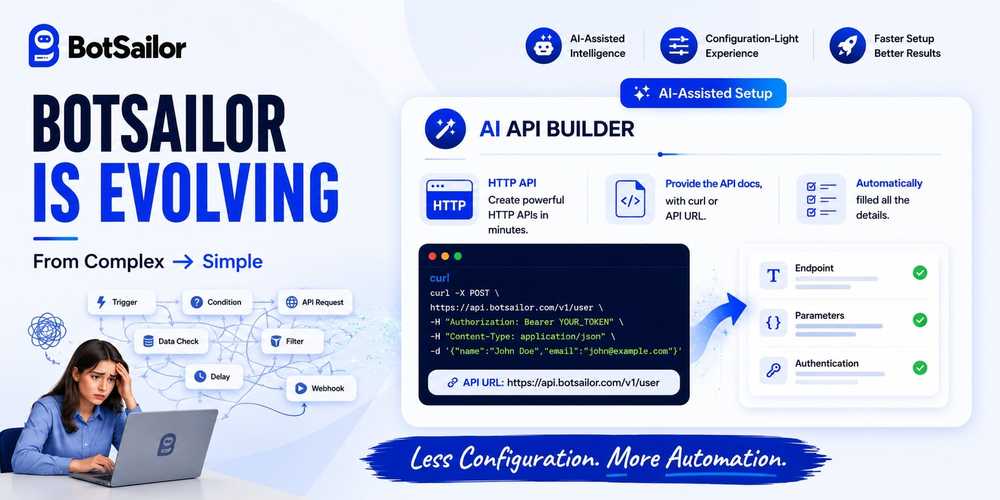
Over the coming months, you'll see BotSailor gradually evolve toward a smarter and easier-to-configure platform — where complex tasks become simpler, onboarding becomes faster, and automation becomes more accessible for everyone.
As the first step in that journey, we're introducing AI Assistant for HTTP API Integration.
Instead of manually configuring every request, users can now describe their integration, paste API documentation, provide a cURL command, or share a JSON example. BotSailor AI helps generate API configurations, variables, and response mappings — dramatically reducing setup time.
This is only the beginning.
Our goal isn't to replace flexibility. Our goal is to make advanced automation easier to build, easier to understand, and easier to maintain.
The future of BotSailor is powerful automation with a much simpler experience.
What Is the AI HTTP API Setup?
The AI HTTP API Setup is an intelligent configuration assistant built directly into BotSailor's HTTP API node. Instead of manually filling out headers, body parameters, authentication fields, and custom field mappings, you provide the AI with two things:
- The API URL you want to connect to
- The API documentation (or a description of what the endpoint does)
The AI reads this information, understands the structure of the API, and automatically configures the request — including the correct HTTP method, headers, body format, and field mappings that pull data from your chatbot flow.
You still stay in control of a few key things:
- Entering your Token or API Key (for security, the AI won't guess your private credentials)
- Reviewing the custom field selections to make sure the right chatbot variables are mapped to the right API fields
- Filling in any static values the API specifically requires (such as a fixed sender ID, a department code, or a default language parameter)
That's it. The AI handles everything else.
Why This Is a Game-Changer
Before this feature, setting up an HTTP API in BotSailor looked something like this:
- Read through pages of API documentation
- Understand REST concepts like GET vs POST, JSON bodies, Bearer tokens
- Manually map each field — getting one wrong would break the entire integration
- Debug silently failing requests with no clear error message
Most non-technical users gave up before they finished. Many businesses had to hire developers just to unlock one integration.
Now, the same setup takes a few minutes — and you don't need to understand a single line of code.
A Real Example: Checking Shopify Order Status via BotSailor Chatbot
Let's walk through a real-world example. Imagine you run a Shopify store and want your BotSailor chatbot to automatically fetch and display a customer's order status when they ask — without any manual lookup on your end.
A customer messages your WhatsApp chatbot: "Where is my order?" — and instead of your team having to check Shopify manually, the chatbot fetches the live order status instantly and replies with the details.
Here's how you'd set this up using the AI HTTP API Setup.
Step 1 — Open the HTTP API
From the left navigation menu, select Integration, then select HTTP API, and click the "Create" button. You will see an AI chat panel on the top left — simply start the conversation by pasting your API cURL or URL along with your documentation, and the AI will configure the endpoint automatically.
Step 2 — Click "Setup with AI"
Paste the following into the AI chat panel:
API cURL:
curl -X GET https://ronok14.myshopify.com/admin/api/2025-01/orders.json \
-H "X-Shopify-Access-Token: YOUR_ACCESS_TOKEN_HERE"
Documentation:
This endpoint retrieves a single order from a Shopify store.
Method: GET
Header: X-Shopify-Access-Token (required)
URL Parameters:
- orders: The ID of the order to look up (dynamic, from customer input)
Step 3 — The AI Configures Everything
The AI reads the documentation and automatically sets up:
- Method: GET
- Header: X-Shopify-Access-Token: [your token] — flagged for you to fill in
- URL construction: The “orders” is mapped to #order_id# — a variable already collected earlier in your chatbot flow

Step 4 — You Review and Fill In Your Values
The AI flags what it needs from you:
Your Access Token: You enter your Shopify Admin API access token, which you can generate from your Shopify Partner dashboard.
Custom field check: The AI mapped {orders} to custom field #order_id#. You confirm this is the correct variable — it's the one your flow uses to store the order ID the customer typed in.
Step 5- Test and verify:
Use a test order ID and click on the “Send Test Request” to get sample data from the Shopify, this sample data will help to save response data to custom fields.
Response Mapping to save data to Custom field:
You need to map data to save to a custom field, select the data you want to save and select the custom field to save.
- order.financial_status → saved to {{payment_status}} [Custom field]
- order.fulfillment_status → saved to {{fulfillment_status}} [Custom field]
- order.tracking_number → saved to {{tracking_number}} [Custom field]
Step 6 — Save and Test
Hit Save, then use this HTTP API in a chatbot that asks the customer for their order ID. The HTTP API will process it and save the order data to custom fields. Now trigger the bot with a real order ID — the API returns the order data, BotSailor maps it to your variables, and your chatbot replies:
"Your order #4521 12547886285 has been paid and is currently fulfilled. Your tracking number is BD291048XY.📦"
Total time: under 5 minutes. Zero code written. Zero Shopify API knowledge required.
What the AI Handles vs. What You Control
| Task | Who Handles It |
|---|---|
| Reading and interpreting the API docs | BotSailor AI |
| Setting the HTTP method, such as GET, POST, PUT, or DELETE | BotSailor AI |
| Configuring headers, including content type and authentication format | BotSailor AI |
| Mapping chatbot variables to API fields | BotSailor AI |
| Writing the request body structure | BotSailor AI |
| Entering your API token or secret key | You |
| Reviewing and confirming custom field mappings | You |
| Providing required static values, such as IDs, codes, or fixed parameters | You |
The AI does the technical architecture. You stay in control of your credentials and final review.
Who Benefits Most from This Feature?
Small business owners who manage their own chatbots without a tech team can now connect their flows to CRMs, payment systems, delivery trackers, email platforms, and more — without waiting on a developer.
Marketing teams can build richer automation campaigns that trigger real-time API calls — syncing lead data, firing webhooks, or updating customer records — all without touching a single line of JSON.
Agencies building chatbot flows for clients can set up complex HTTP integrations in a fraction of the time, even when the client's API documentation is dense or unfamiliar.
New BotSailor users who are still exploring the platform no longer have to skip the HTTP API node because it feels too advanced. It's now as approachable as any other node in the flow.
A Note on Security
Your API tokens and secret keys are entered by you and are never exposed to or inferred by the AI. BotSailor's AI setup assistant reads structural information (fields, methods, formats) from what you provide — it does not store, transmit, or guess your credentials.
As always, BotSailor recommends using tokens with the minimum permissions necessary for the integration you're building.
Supported Integrations
The AI HTTP API Setup works with virtually any REST API that provides documentation, including:
- E-commerce platforms (Shopify, WooCommerce, BigCommerce)
- CRM platforms (HubSpot, Salesforce, Zoho)
- Payment gateways (Stripe, PayPal, SSLCommerz)
- SMS and email gateways (Twilio, SendGrid, TextFlow)
- Delivery and logistics tracking APIs
- Custom internal APIs built by your own team
- ERP systems, helpdesk platforms, and more
If it has an API URL and documentation, BotSailor's AI can configure it.
Get Started Today
The AI HTTP API Setup is available now for all BotSailor users. To try it:
- Click on HTTP API -> Create
- AI will set up the HTTP API
- Paste your API URL and documentation to the AI [In the left side of the HTTP API node]
- Open any flow in BotSailor
- Add anHTTP APInode
- Click"Select the HTTP API"
- In the next reply use Custom fields data to deliver the info the HTTP API brings to BotSailor.
HTTP API integrations were once reserved for developers. Now they belong to everyone.