
Smart Delay is BotSailor’s new reply-timing feature that lets you schedule chatbot messages anywhere from 0 seconds to 24 hours. It helps create natural, human-like conversations, improves engagement, and gives you full control over when each bot reply is delivered.
The right timing is the silent force behind conversion, loyalty, and an effortless user experience in the world of automated customer engagement. For a prolonged period, companies have been unable to create truly complex and strategic bot flows due to the constraints of short, restrictive message delays, which are frequently limited to just 60 seconds.
We're breaking down that barrier at BotSailor. We are excited to present Smart Delay, a ground-breaking feature that turns basic pauses into strong, accurate automation. You can now schedule message replies for anywhere from 0 seconds to a full 24 hours, giving you complete control over the timing of your bot.
Smart Delay is an intelligent conversation-design tool designed to maximize each step of your customer journey, not just a setting.
What is Smart Delay and Why the 24-Hour Window Matters
This advanced automation step called Smart Delay is built right into the BotSailor flow builder. It ensures that the message is delivered at the exact moment when it is most relevant by enabling you to pause the conversation flow for a predetermined, customized amount of time before sending your next message.
The expansion to a24-hour windowis vital for modern marketing automation:
- Critical Re-engagement:This timeframe is essential for platforms like Facebook Messenger, where timely follow-ups are critical for compliance and maintaining high engagement rates.
- Strategic Nurturing:It enables you to move beyond immediate Q&A and implement structured, multi-stage sequences that unfold over a full day.
Unmatched Precision Timing
Unlike basic delays, Smart Delay gives you granular control over the timing, making your follow-ups incredibly accurate:
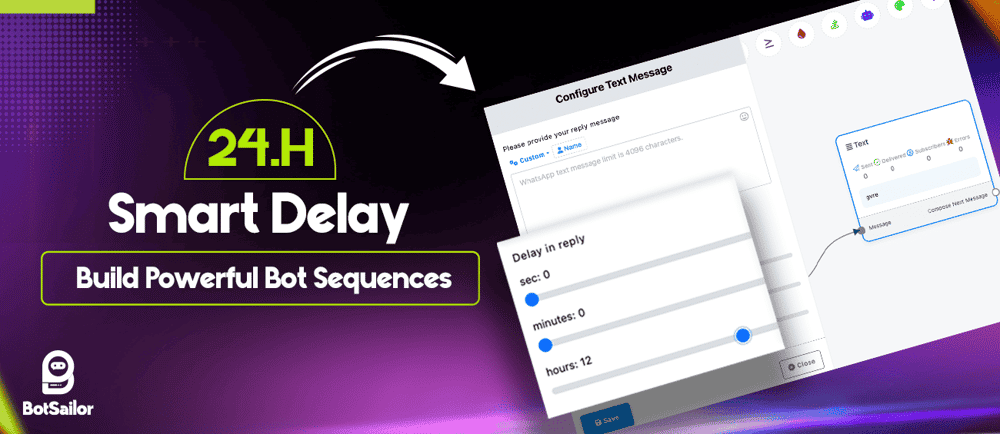
- Flexible Control:Set your delay using dedicated input fields forHours (0-24),Minutes (0-59), andSeconds (0-59).
- Instant Reactions:Use a0-seconddelay for immediate, conditional reactions when paired with logic blocks.
Beyond the Basics: BotSailor's Unique Advantages
BotSailor's Smart Delay is integrated with key platform features to make it a superior tool for maximizing conversion rates and flow completion.
1. Integration with Interactive ElementsSmart Delay is versatile, it isn't limited to standard text blocks. You can use it inText reply nodes,Interactive reply elements, and throughout yourcomplex workflow sequences.
Crucially, Smart Delay can be embedded directly within aninteractive node, specifically tied to button actions. This allows for highly contextual re-engagement:
- Action-Specific Follow-ups:Send a reminder only if a user clicks "Learn More" but fails to click the next call-to-action button within the delay window.
- "No-Click" Prompts:Automatically prompt users for their next step if they view a set of options but do not clickanybutton within the designated time.
To protect your brand and respect your subscribers, Smart Delay works at its finest with theCondition Blockto prevent spamming and ensure relevance.
- Conversion Check:By tagging users who complete a desired action (e.g.,#Purchased), you can place a Condition Blockbeforethe Smart Delay follow-up message.
- Smart Filtering:The follow-up message willonlybe sent if the condition checks that the conversion tag"isn't"present, guaranteeing you only reach out to leads who still need a nudge.
The ability to set precise delays up to 24 hours transforms BotSailor into a powerful engine for conversational drip campaigns. This functionality moves beyond simple auto-responses, allowing you to design sophisticated, sequential flows that guide leads through the entire sales funnel.
You can strategically space out complex educational content, progressively introduce value-based messages, and time specific offers to coincide with peak engagement moments. By segmenting this content over a full day, you avoid overwhelming the user, build anticipation, and nurture leads naturally, ensuring the right message is delivered at the perfect stage of their decision-making process.
High-Impact Abandoned Cart Recovery
Abandoned carts are the single biggest point of lost revenue for e-commerce, but Smart Delay provides a high-converting solution. Unlike passive emails that often get lost in an inbox, the chatbot can be programmed to deploy a re-engagement sequence via the messaging channel (like Messenger or WhatsApp), which boasts superior open rates. Crucially, you can set the delay for thecritical first few hours(e.g., 15 minutes or 3 hours) after abandonment to catch the user while their purchase intent is still high. By integrating this delay with conditional logic, the bot can instantly remind the user of the specific items they left behind and offer a targeted incentive, recovering sales that would otherwise be lost.
Top Strategic Use Cases for Smart Delay
The precise and extended timing capability of Smart Delay unlocks numerous powerful strategies for every business model:
Engagement & Nurturing
- Human-Like Pacing:Short delays (1–5 seconds) simulate a real person typing, making conversations feel natural, friendly, and thoughtful.
- Structured Education:Deliver lessons, tips, or product recommendations with short or long intervals, spacing out instructions to avoid overwhelming the learner.
- Mid-Funnel Re-engagement:Use a shorter delay (15 minutes) to send a friendly nudge to leads who dropped off mid-form submission or flow.
- Lead Magnet Completion:Follow up if a user clicked the download link but did not complete the download.
- Timely Event Reminders:Automate timely nudges for webinars or appointments, sending confirmation immediately and a reminder closer to the event (4–8 hoursprior).
- Post-Interaction Feedback:Set a delay (12–24 hours) to automatically request product reviews, satisfaction surveys, or follow up on unresolved support tickets.
- Order Updates:Provide order updates or delivery details with natural, well-spaced intervals.
How to Implement Smart Delay in BotSailor

Integrating this powerful new functionality into your flows is straightforward:
- Open any message block in your BotSailor flow builder.
- Find the Delay in Text Reply configuration section, after Start bot flow or Interactive button.
- Set your desired timing using the Hours, Minutes, and Seconds input sliders.
- Click Save.
Your automation will now follow your perfectly calculated pace, ensuring a smoother, more engaging bot experience.
Ready to Transform Your Conversions?Stop letting valuable leads slip through the cracks due to rigid timing constraints.Smart Delaygives you the control you need to build more resilient, responsive, and profitable conversational experiences.
Log into your BotSailor dashboard todayand start implementing 24-hour precision automation. Your conversations will never feel the same again—in the best way possible.
Check out our recent helpful blogs to improve your chatbot skills and get the most out of BotSailor:
Introducing the Ultimate Professional Appointment Booking System
How To Build A Simple WhatsApp Chatbot Without Coding
AI-Powered Support: Shared Inbox with Smart Assistant & IQ Analysis