Chat with us
NewAI Agents Just Got More Affordable — GetGet2.5xMore AI TokensMore AI TokensPricing
Shared Inbox + AI + CRM + Automation

One Inbox
Every Customer Conversation

BotSailor's Omnichannel Shared Inbox brings conversations, AI, automation, CRM, follow-ups, and team collaboration into one workspace. Manage WhatsApp, Messenger, Instagram, Telegram, and website chat without jumping between tools.

  • Assign & Join Chat
  • Inbox IQ
  • CRM on the thread
  • Pause Bot & AI
  • Labels & sequences
  • Follow-ups
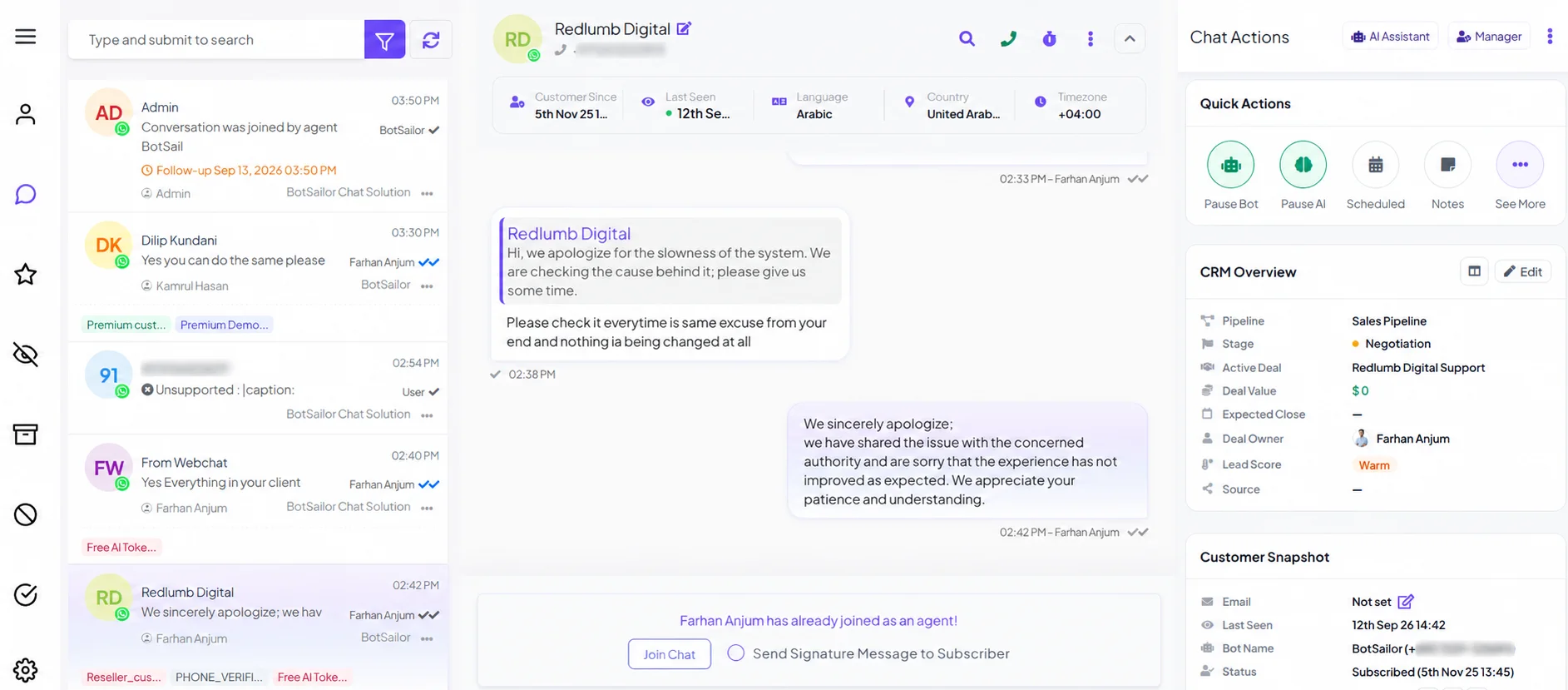
BotSailor Shared Inbox: conversation list, live chat, Join Chat, CRM, and customer snapshot in one workspace
Join ChatCRM on the threadPause Bot · Pause AI
Stop switching channels, tabs & tools

All Your Conversations in One Shared Workspace

WhatsApp today. Instagram tomorrow. Messenger after an ad. BotSailor puts every thread in one list so sales and support stop losing context—and stop losing replies.

  • WhatsApp
  • Messenger
  • Instagram
  • Telegram
  • Website
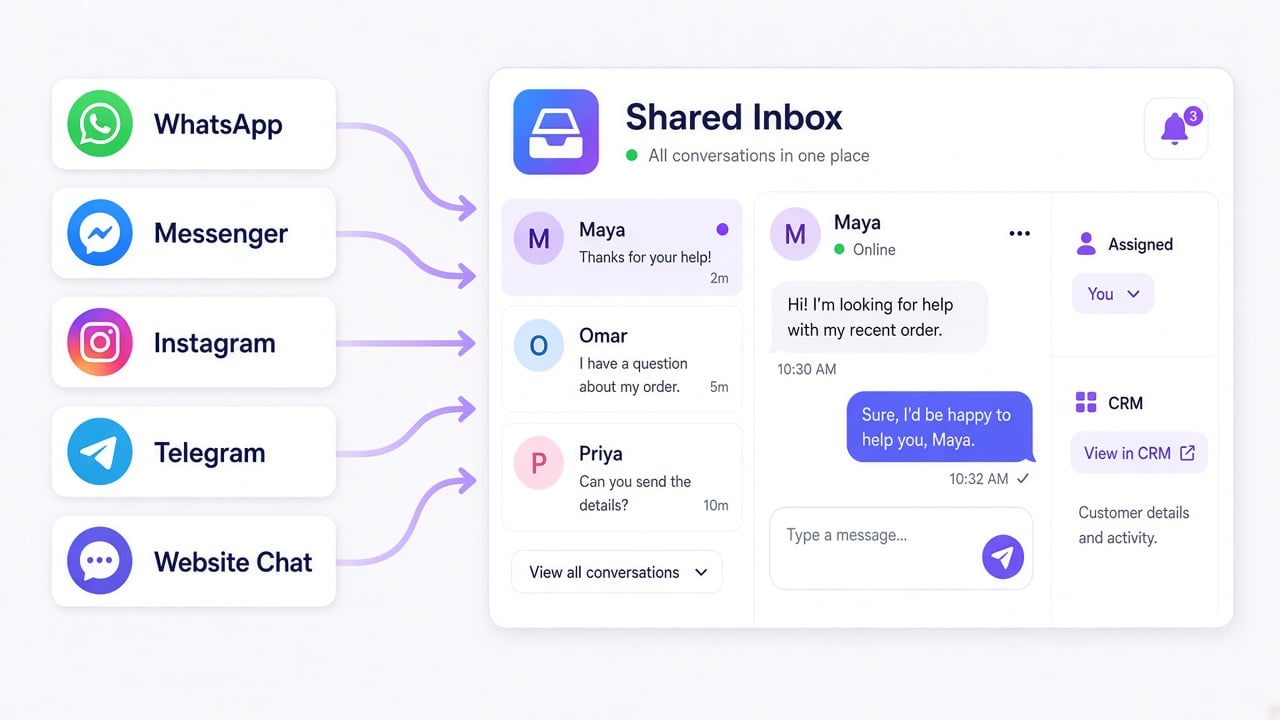
WhatsApp, Messenger, Instagram, Telegram, and website chat flowing into one BotSailor Shared Inbox
  • Sales teams
  • Customer support
  • Ecommerce
  • Lead management
  • Agencies
Built for more than just replying

Every Chat Has an Owner. The Next Agent Has the Notes.

Assign a teammate, Join Chat with an optional signature, and leave notes the customer never sees. The next agent opens the thread already briefed—instead of asking the customer to repeat everything.

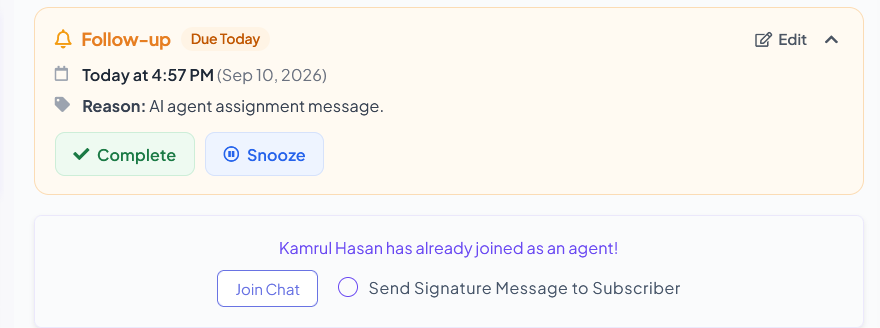
Follow-up due today with Complete and Snooze, plus Join Chat when a teammate is already in the conversation
Join Chat

One owner. One voice.

  • See who already joined before you reply
  • Join with an optional signature message
  • Pause the bot or AI so the customer is not answered twice
Internal notes

Context the customer never sees

  • Switch the composer from Reply to Note
  • Leave why this lead is hot—or what already failed
  • The next agent opens the thread already briefed
How it works

Live in Four Steps

Connect channels, put the team in one inbox, then sell and support from the same thread.

1

Connect channels

Link WhatsApp, Messenger, Instagram, Telegram, and website chat.

2

Invite the team

Sales and support share one queue instead of five apps.

3

Assign, label, sequence

Own the chat, tag the customer, start a sequence, and set a follow-up.

4

Use IQ and CRM

Read the briefing, update the deal, reply with a canned answer or a flow.

Organize while you chat

Labels, Sequences, and Custom Fields—On the Conversation

The sidebar is not just CRM. Agents assign an owner, tag the customer, drop them into a list, start a message sequence, and update custom fields without opening another screen. That is how a live chat becomes structured customer data.

Automation & Flow
Assigned agentTeam member
Labels
ResellerVIPWaiting on payment
ListWhatsApp inbound
SequencePricing follow-up · 3 messages
Custom field · PlanAgency
Custom field · Seats12
Custom field · SourceInstagram ad
AI Agents and human agents

AI Agents Handle Conversations. Humans Take Over When Needed.

BotSailor lets AI and your team work in the same customer journey. Pause bot and AI independently. Resume either when automation should take over again—without permanently disabling your setup.

1AI Agent

The AI Agent answers routine questions and keeps the conversation moving.

2Conversation

History, customer data, and context stay on the same thread.

3Human takeover

Join Chat, then Pause Bot or Pause AI for sensitive or high-value work.

4AI resume

Resume Bot or Resume AI when the team is done—automation continues.

Granular control
Pause BotPause AIResume BotResume AI

See AI Agents

AI-powered conversation intelligence

Understand the Customer Before You Respond

Inbox IQ reads the last messages and returns what the product actually scores: a short summary, lead score (0–100), churn risk, sentiment and trend, whether they are already a customer, and one next action—coupon, escalate, upsell, or ask for information.

Inbox IQ

Asked how bot vs AI handoff works and whether a human should take over. Evaluating the product—not a casual visitor.

78Lead score / 100
12%Churn risk
PositiveSentiment · trending up
NoAlready a customer
CouponEscalateUpsellInfo request
Ask for their current inbox setup, then offer a live walkthrough
A lightweight conversational CRM

Move Deals Forward Without Leaving the Inbox

Pipeline, stage, deal, value, owner, lead score, source, and expected close sit beside the chat. The customer snapshot—email, last seen, bot, subscription, and messaging-window status—stays in the same sidebar. AI can fill deal fields from the conversation. Open the Kanban board without leaving Shared Inbox.

Conversation CRM
NewQualifiedProposalWon
PipelineSales pipeline
StageQualified
Active dealInbound WhatsApp
Deal value$2,400
Expected closeThis month
Deal ownerAssigned agent
Lead scoreWarm
SourceWhatsApp ad
Inside the 24-hour messaging window · AI can autofill this deal from the chat
Follow-ups on the conversation

Never Let an Important Conversation Go Cold

Create a follow-up from the inbox: date and time, reason, and an internal note. Quick options—1 Hour, 2 Hours, 4 Hours, 6 Hours, 12 Hours, and 1 Day—keep common reminders one tap away. Upcoming and completed follow-ups stay with the customer.

Set follow-up
Date & timeTomorrow · 10:00 AM
1 Hour2 Hours4 Hours6 Hours12 Hours1 Day
ReasonSend pricing details
Internal noteThey asked for agency plan vs. seat count.
Save follow-up
From conversation to action

Don't Just Answer Customers. Move Them Forward.

Support, sales, and automation happen in the same thread—so a reply can become a deal update, a follow-up, or a bot flow without switching tools.

Qualify the lead

  1. Open Inbox IQ for score, intent, and sentiment
  2. See source and whether they are already a customer

Update CRM

  1. Move the stage and set deal value
  2. Assign an owner and add a label

Schedule follow-up

  1. Set time, reason, and an internal note
  2. Or start a sequence from the same sidebar

Close the deal

  1. Send a canned reply, flow, or template
  2. Keep the next action on this conversation
Same inbox. More firepower.

The Rest of the Desk Stays in the Thread

Assignment, CRM, IQ, follow-ups, and bot control already have their own sections. These are the other live inbox tools teams use after they open a chat.

Shopify & Woo orders

See live order status in the conversation instead of opening the store admin.

Google Meet

Create a meeting link on the subscriber and send it without leaving the inbox.

Translate & AI rewrite

Translate the reply you are about to send, or rewrite it before it goes out.

AI Assistant

Ask about the customer or conversation and get help preparing a reply while the agent stays in control.

File attachments

Share files from the composer in the same live conversation.

Mine, Unread, Important, Resolved

Filter the queue the way a desk works—not one endless unowned list.

Installable inbox (PWA)

Install Shared Inbox on a phone or laptop and get web push when a chat needs you.

Faster replies in the composer

Type / and the Reply Is Already Written

Canned replies are saved team answers—pricing, onboarding, support links—not generated copy. Type / to insert one. In the same composer you can also translate or AI-rewrite the draft you are about to send, or switch to an internal Note.
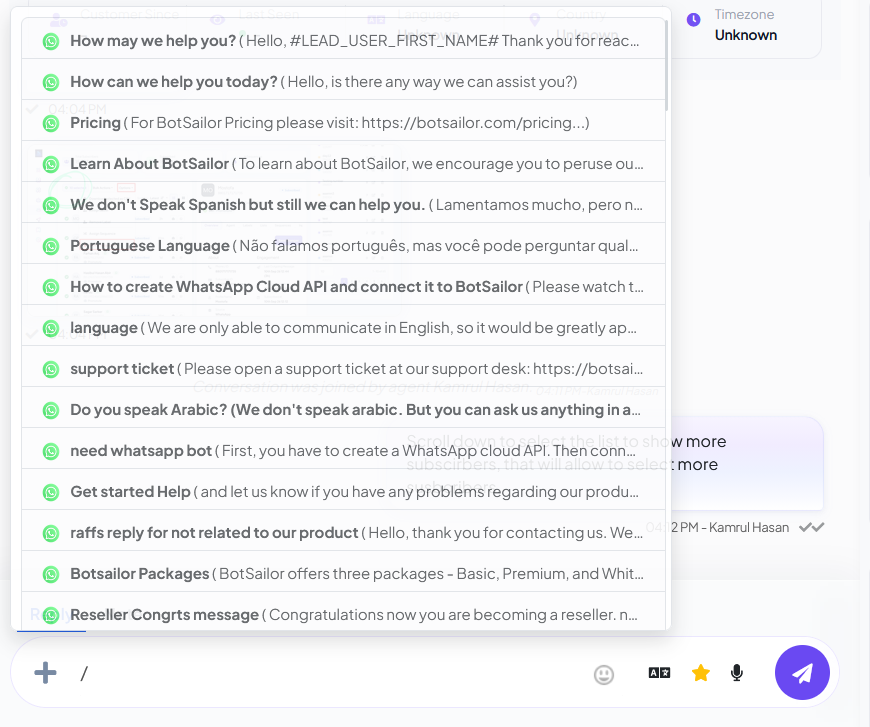
Slash-command canned replies in the Shared Inbox composer
Trigger automation from the thread

Send a Flow Now—or Schedule It for Later

Agents are not limited to typing. From Shared Inbox they can send a bot flow, message template, or WhatsApp Flow in this conversation—immediately or at a time you choose.

Send from this chat

Send now

Fire the flow or template in this conversation immediately.

Send later

Schedule the same flow for a follow-up window you choose.

FAQ

Shared Inbox FAQ

Channels, Inbox IQ scores, CRM autofill, store orders, and bot handoff—answered from the real product.

BotSailor Shared Inbox is an omnichannel team inbox and CRM. It unifies WhatsApp, Facebook Messenger, Instagram Direct, Telegram, and website chat so sales and support teams can assign conversations, add internal notes, set follow-ups, and hand off from chatbots to humans in one workspace.

WhatsApp, Facebook Messenger, Instagram Direct, Telegram, and website chat. Customer email can appear on a contact profile, but email is not an inbox channel.

Yes. Each conversation can show a CRM overview: pipeline, stage, deal value, owner, lead score, and source. Agents also see the customer snapshot, labels, custom fields, and notes without leaving the thread.

Yes. From the conversation sidebar, agents can assign an owner, add or remove labels, place the customer in a list, subscribe them to a message sequence, and update custom fields without leaving the thread.

Yes. You can assign an agent, join or leave a chat, add internal notes the customer cannot see, and use labels to keep work organized. A signature message can be sent when an agent joins.

The agent takes the live conversation. Bot reply can be paused so the customer does not get a bot and a human at the same time. The team can optionally send a signature message when they join.

Inbox IQ is an AI analyst inside Shared Inbox. It reads recent messages and returns a short summary, lead score (0–100), churn risk, sentiment and trend, whether they already look like a customer, and one next action: coupon, escalate, upsell, or information request.

Yes. Connected store orders can appear in the conversation so agents check status without leaving the inbox. Pair it with a Shopify WhatsApp AI Agent if you want the bot to look up orders before a human joins.

Yes. Agents can create a Google Meet link from the sidebar and send it to that customer without leaving the conversation.

Optionally, yes. Shared Inbox CRM can auto-fill deal fields from the conversation using AI. You can turn that autofill on or off in inbox settings.

Agents can install Shared Inbox as a PWA on phone or desktop and receive web push when a conversation needs them. It is the same inbox, not a separate helpdesk app.

Yes. Type / in the composer to insert a saved reply. Agents can also send a bot flow or message template, attach a file, or switch from Reply to an internal Note.

Yes. From the same thread you can send a bot flow, message template, or WhatsApp flow now, or schedule it for later, while keeping bot and AI pause controls on the conversation.

Agents can set a follow-up with a time, reason, and optional note. Due reminders appear on the conversation so the team can complete or snooze them instead of losing the lead in a spreadsheet.

Sales and support teams that talk to customers on WhatsApp and social DMs. It fits ecommerce, agencies, and growing teams that need one inbox, assignment, notes, CRM context, and chatbot handoff, not an email helpdesk.

See Shared Inbox in your workspace

Create a free account, connect a channel, and open the omnichannel inbox.

How the live chat inbox worksContact Us
Conversation. Context. Team. Action.

Bring your team, AI Agents, automation, CRM, and follow-ups together in Shared Inbox.